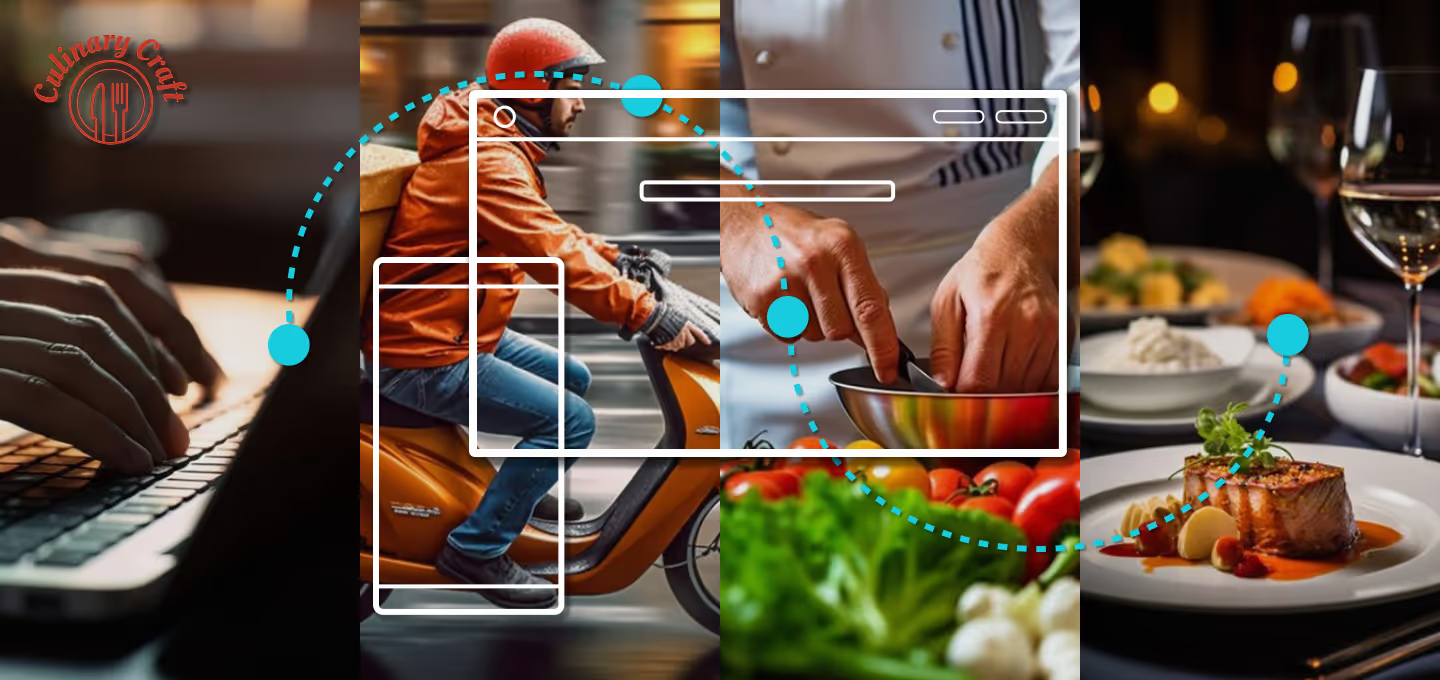
A four-panel visual representing the user journey in the Culinary Craft food subscription platform.
From left to right:
A person typing on a laptop (placing an order online).
A delivery driver on a scooter (food box in transit).
A person preparing fresh ingredients in a kitchen (following recipe instructions).
A gourmet plated meal with wine in a restaurant-style setting (final result of home cooking).
Overlayed UI wireframe elements and dotted lines visually connect each phase, symbolizing seamless digital experience and user flow—from selecting a recipe to enjoying the meal.
The Food Box, Culinary Craft project is a 2024 case study for a meal kit subscription platform designed for a startup aiming to simplify home cooking by delivering pre-portioned ingredients and recipes to users’ doors. The service focuses on reducing food waste, encouraging healthy eating, and offering customizable experiences based on user profiles, dietary needs, and taste preferences. Core features include recipe filtering, nutritional guidance, portion control, ingredient customization, and a flexible subscription model. Optional enhancements may sustainability content, gamification, smart appliance integration, and partnerships with local food suppliers. The platform food safety regulations and allergen labeling, while supporting a subscription-based monetization strategy.

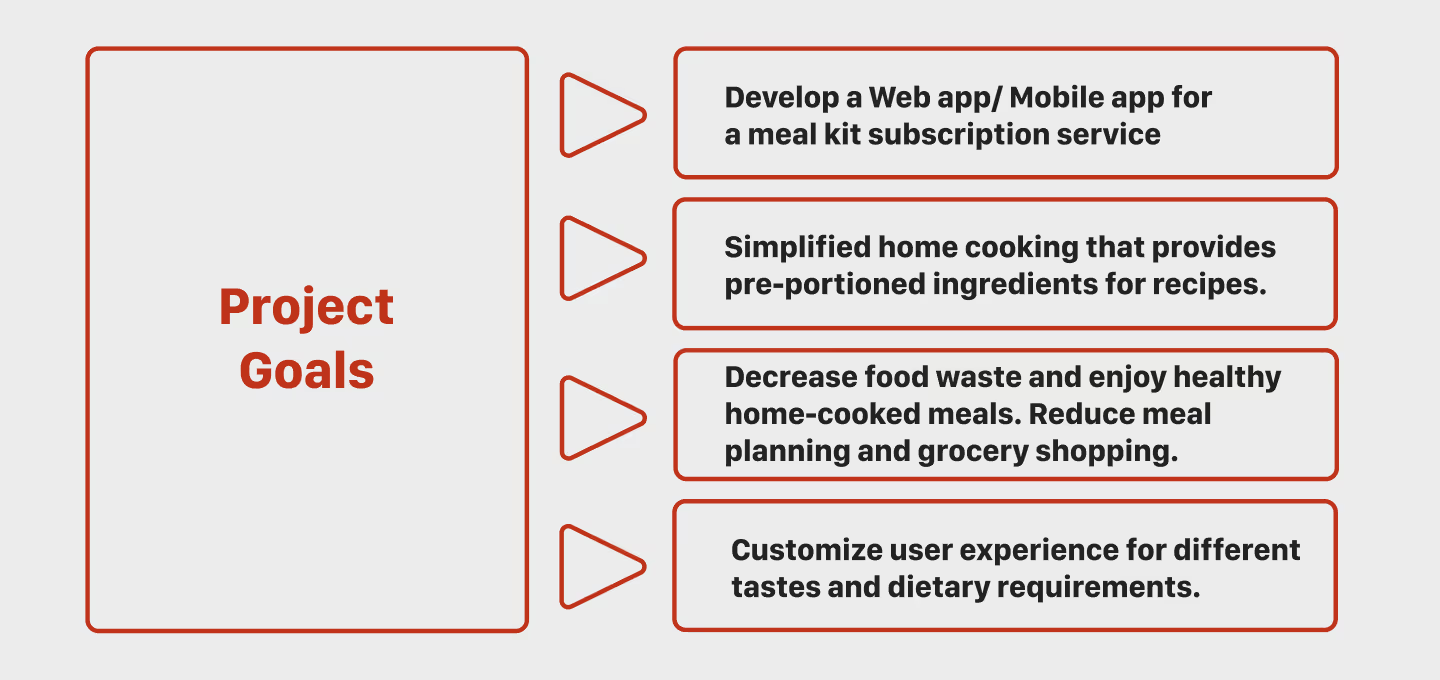
An infographic outlining the core project goals of the Culinary Craft "Food Box" meal kit subscription service.
The visual shows a red-bordered box labeled "Project Goals" connected by arrows to four key objectives:
Develop a web and mobile application for meal kit subscriptions.
Simplify home cooking by providing pre-portioned ingredients.
Decrease food waste and encourage healthy home-cooked meals by reducing grocery shopping and planning.
Customize the user experience based on dietary needs and taste preferences.
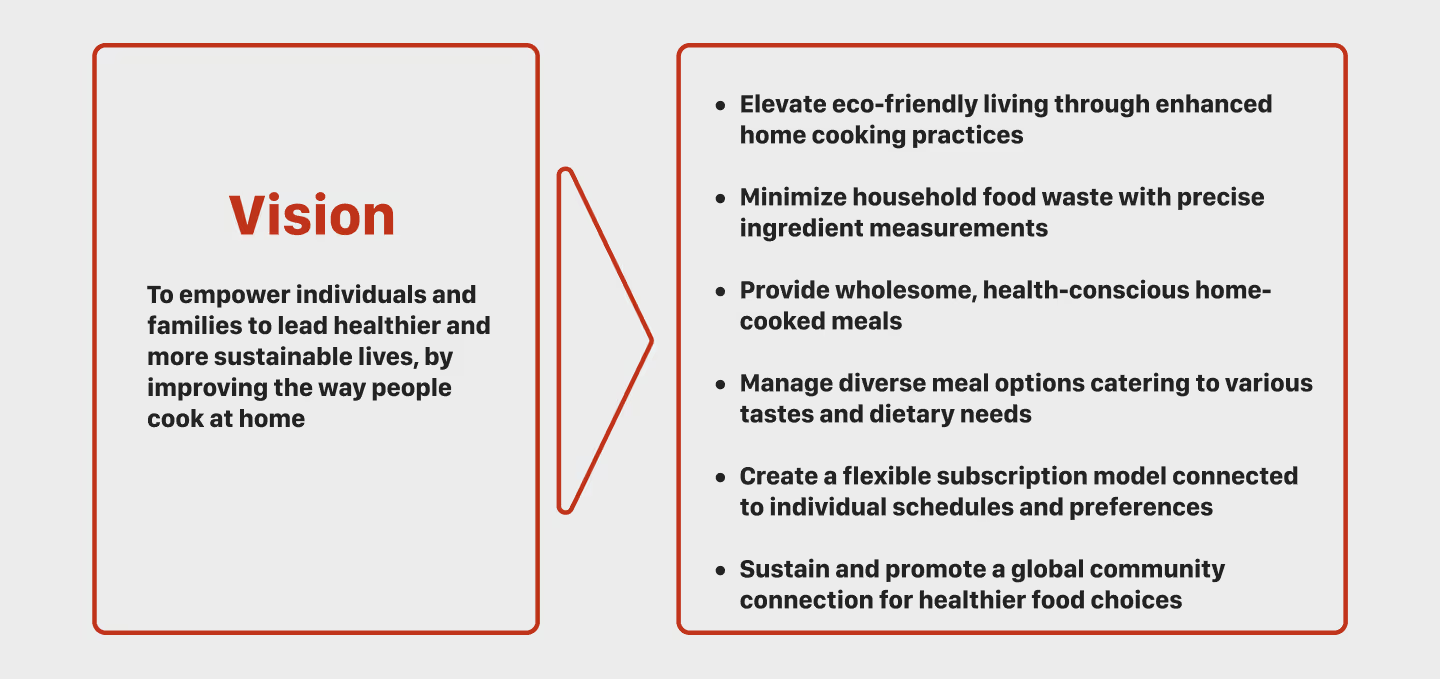
A vision diagram for the Culinary Craft meal kit platform. On the left, a red-bordered box titled “Vision” states the purpose:
“To empower individuals and families to lead healthier and more sustainable lives by improving the way people cook at home.”
On the right, six bullet points outline strategic goals:
Promote eco-friendly living through home cooking.
Reduce food waste via accurate ingredient portions.
Offer nutritious and conscious meal options.
Support varied diets and taste preferences.
Enable flexible subscriptions tailored to individual routines.
Foster a global community for healthier food decisions.
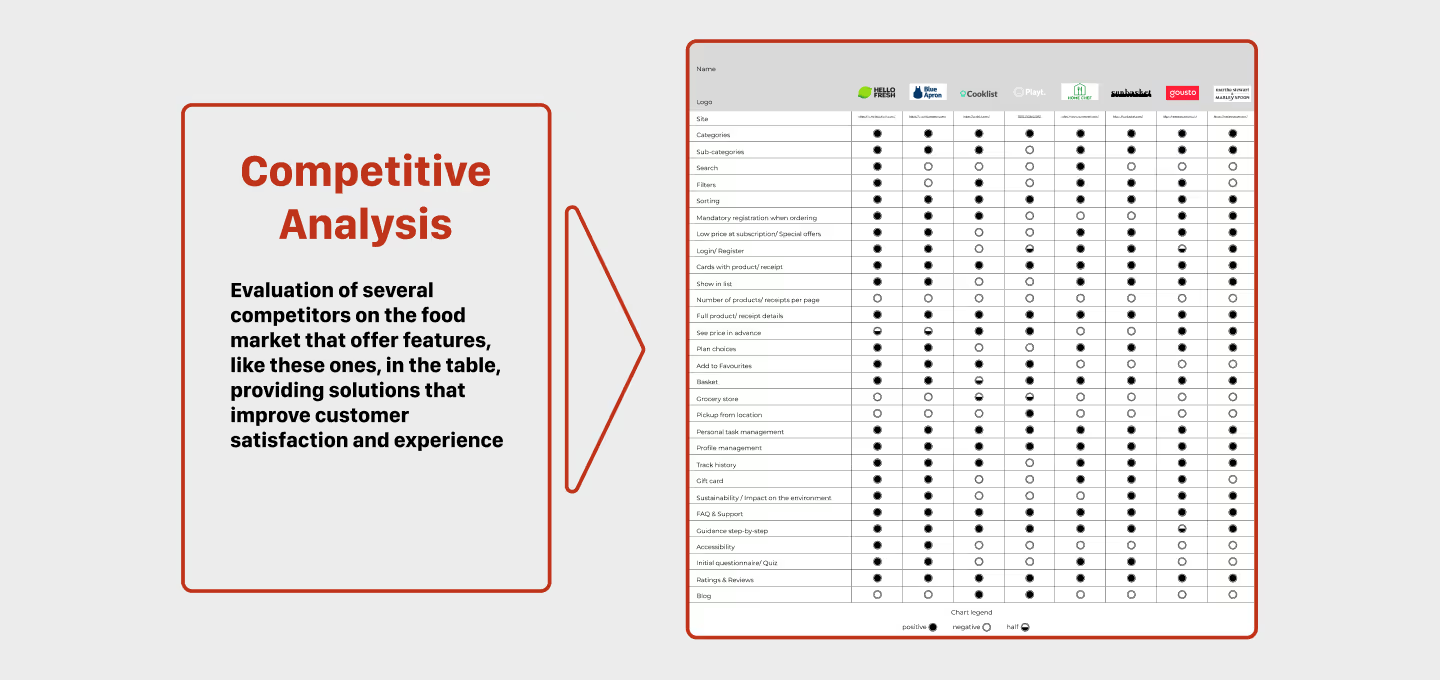
A visual showing a competitive analysis for Culinary Craft. On the left, a red-framed box titled “Competitive Analysis” summarizes the purpose: evaluating competitors in the food tech market to identify features that enhance customer satisfaction and experience. On the right, a detailed comparison table benchmarks major competitors across features like recipe filtering, portion control, dietary personalization, food safety labeling, subscription flexibility, and sustainability. Brands are represented by logos in the header, and rows include dots indicating presence or absence of each feature per competitor.
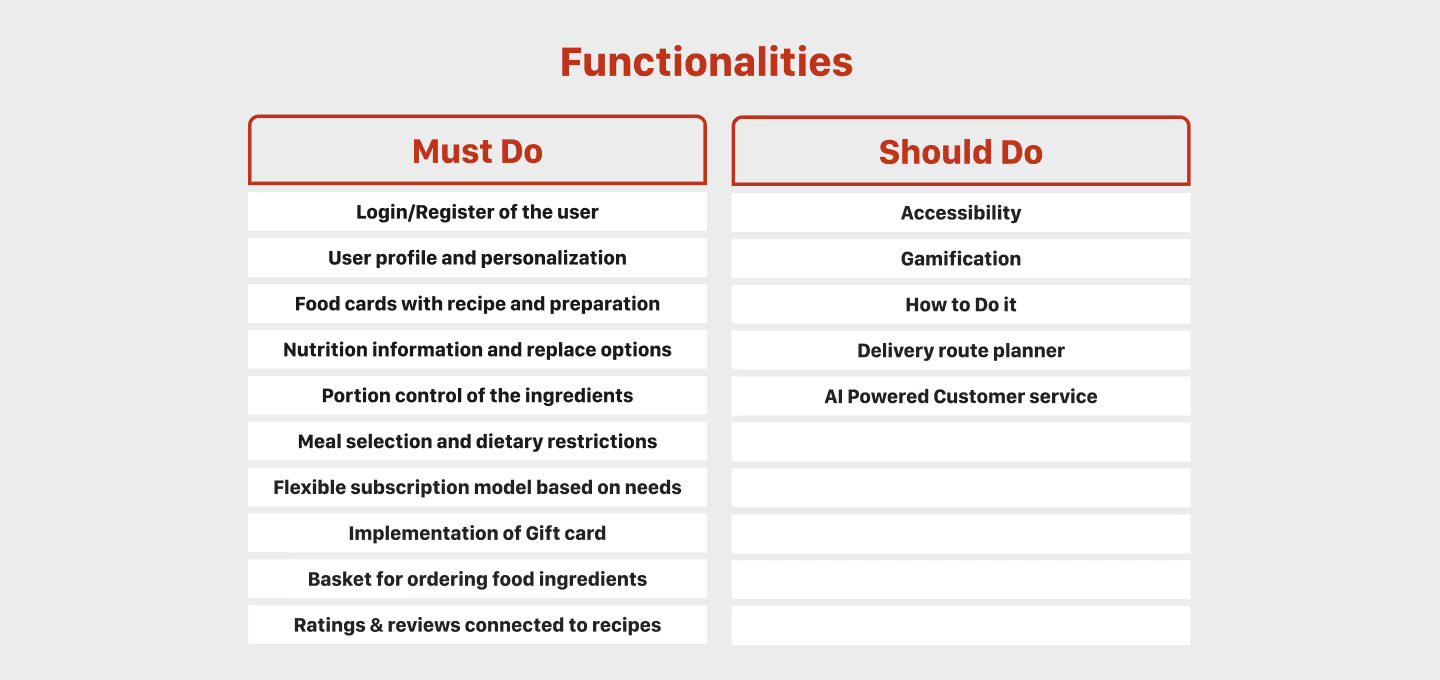
A two-column feature prioritization chart titled “Functionalities” for the Culinary Craft meal kit platform. The left column, labeled “Must Do,” lists essential features such as user registration, personalization, food cards with recipes, nutrition data, ingredient portion control, dietary filtering, subscription customization, gift card support, ingredient ordering basket, and recipe reviews. The right column, labeled “Should Do,” includes optional enhancements like accessibility support, gamification, cooking tutorials, delivery route planning, and AI-powered customer service.
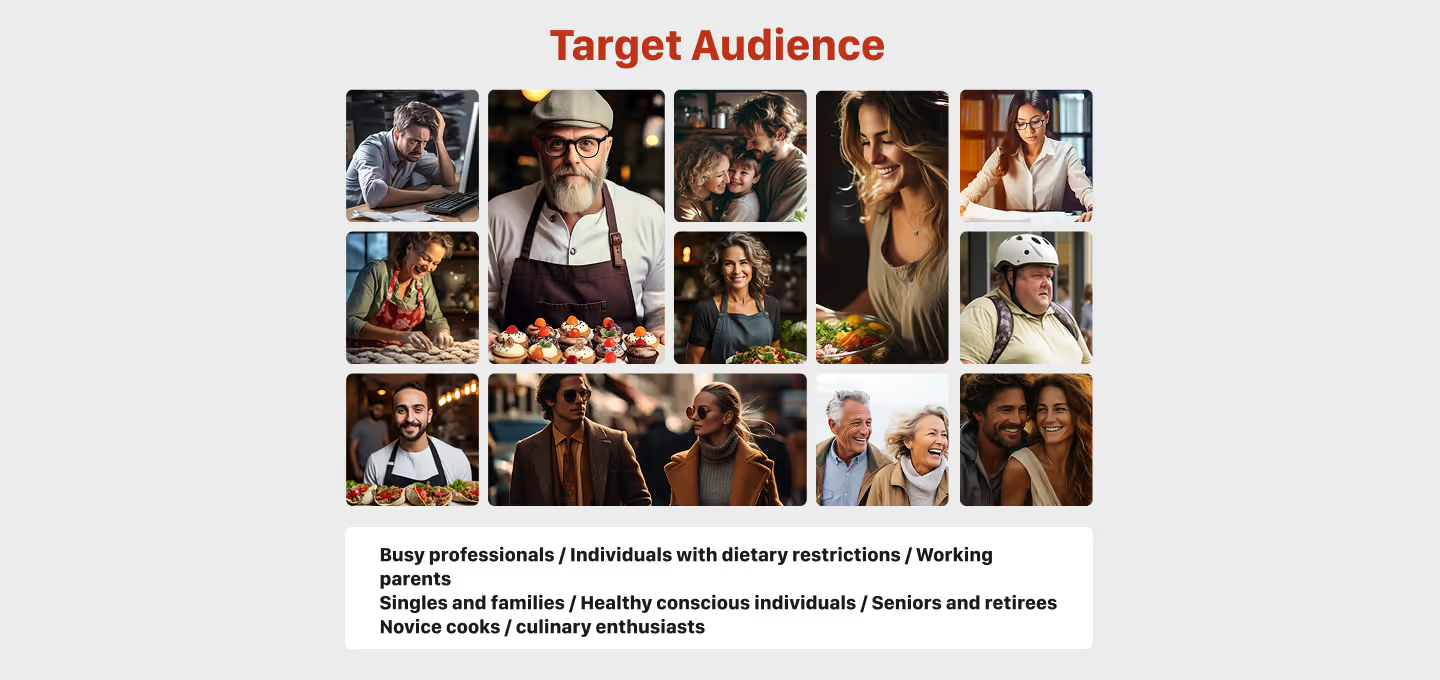
Collage of diverse individuals representing the target audience of a meal kit subscription platform. Includes busy professionals, working parents, seniors, singles, couples, families, and people with dietary needs. The text below outlines user groups: busy professionals, individuals with dietary restrictions, working parents, singles and families, health-conscious individuals, seniors and retirees, novice cooks, and culinary enthusiasts.
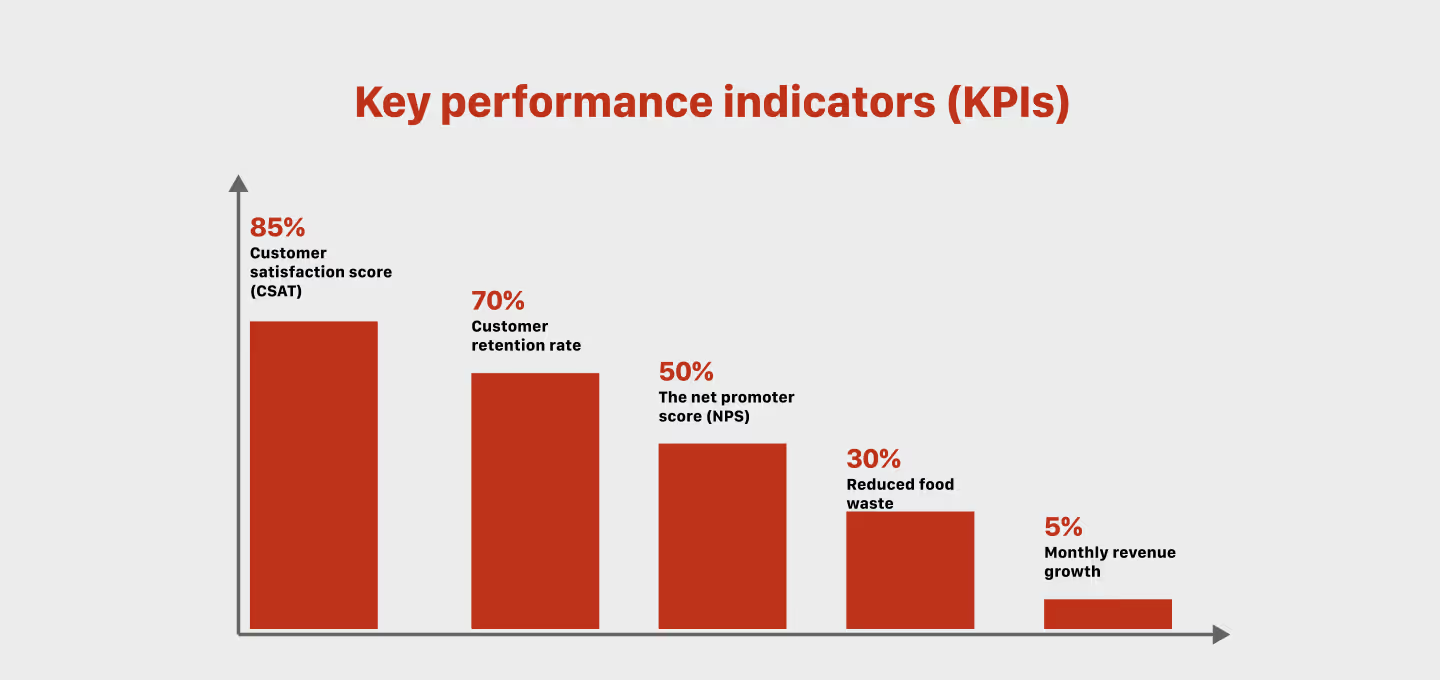
Bar chart displaying key performance indicators (KPIs) for the Culinary Craft meal kit platform. It shows:

85% customer satisfaction score (CSAT),

70% customer retention rate,

50% net promoter score (NPS),

30% reduced food waste,

5% monthly revenue growth.
The KPIs reflect goals for user satisfaction, loyalty, brand advocacy, sustainability impact, and financial growth.
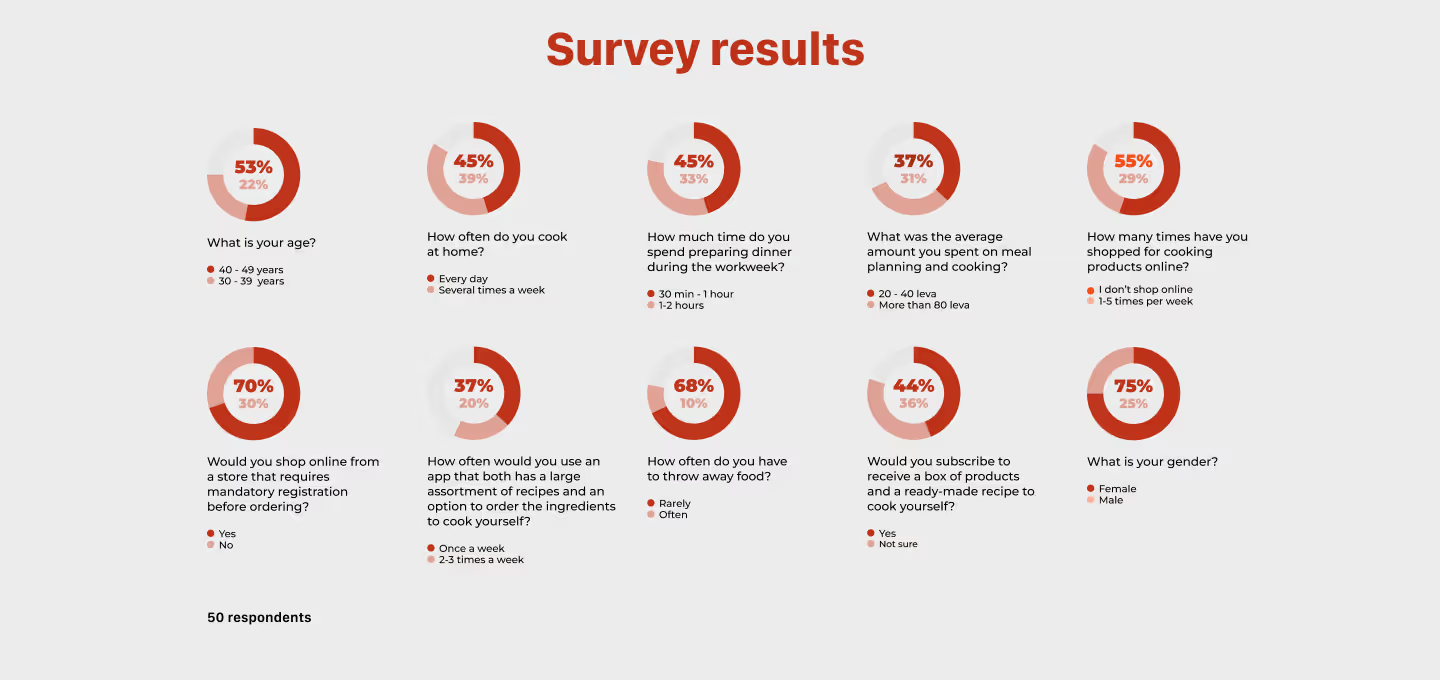
Infographic showing survey results from 50 respondents regarding their cooking habits and preferences for a meal kit subscription service. Key insights include:
53% are aged 26–35
45% cook 3–4 times a week
45% spend 1–2 hours cooking during weekdays
37% spend 1–2 hours on meal planning and cooking
55% have ordered cooking products online
70% are willing to buy from a site requiring registration
68% often lack time to buy food
75% of respondents are female
The results support demand for time-saving, personalized, and user-friendly cooking solutions.
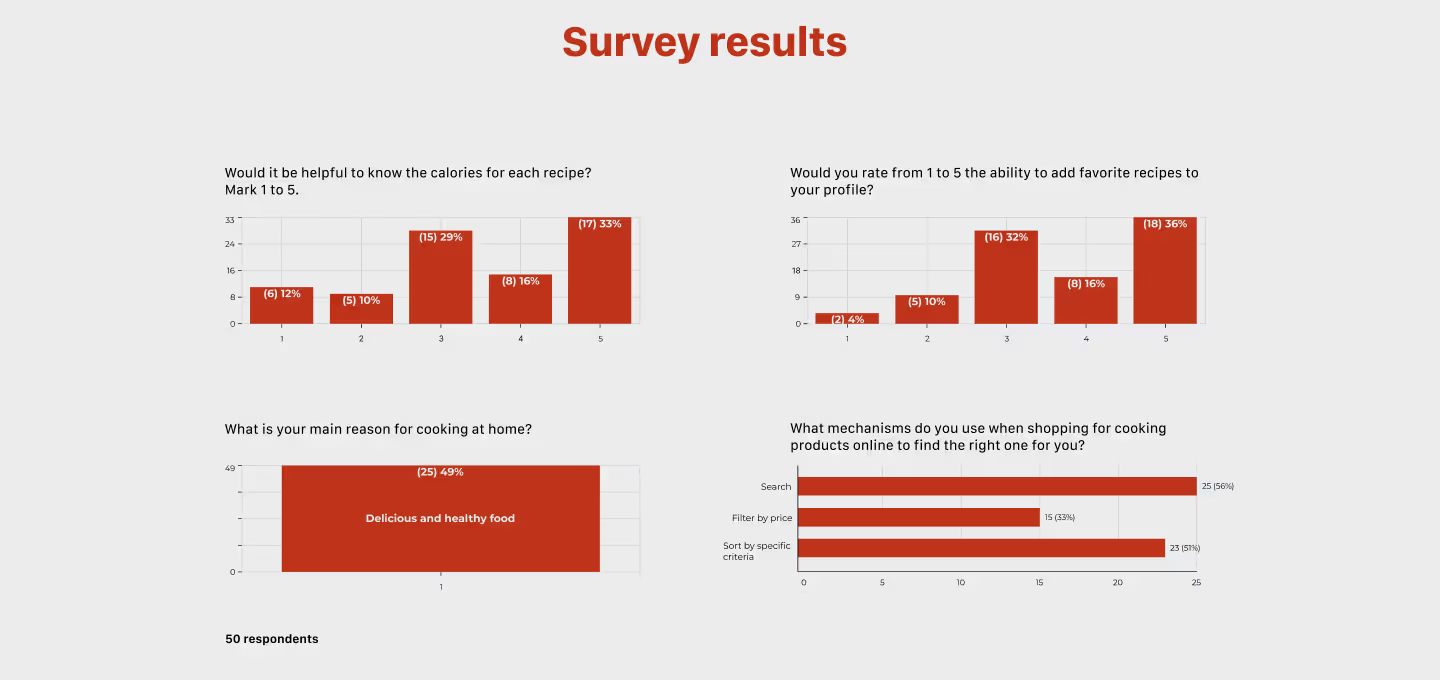
Infographic showing survey results from 50 participants, focusing on user preferences for recipe and shopping features in a meal kit subscription service. Key findings include:
87% of respondents rated the usefulness of knowing calorie content for recipes 4 or 5 out of 5.
86% rated the ability to save favorite recipes as 4 or 5 out of 5.
91% listed “delicious and healthy food” as the main reason for cooking at home.
When shopping for cooking products online, users prefer filters by type (52%) and search terms (46%) to find suitable items.
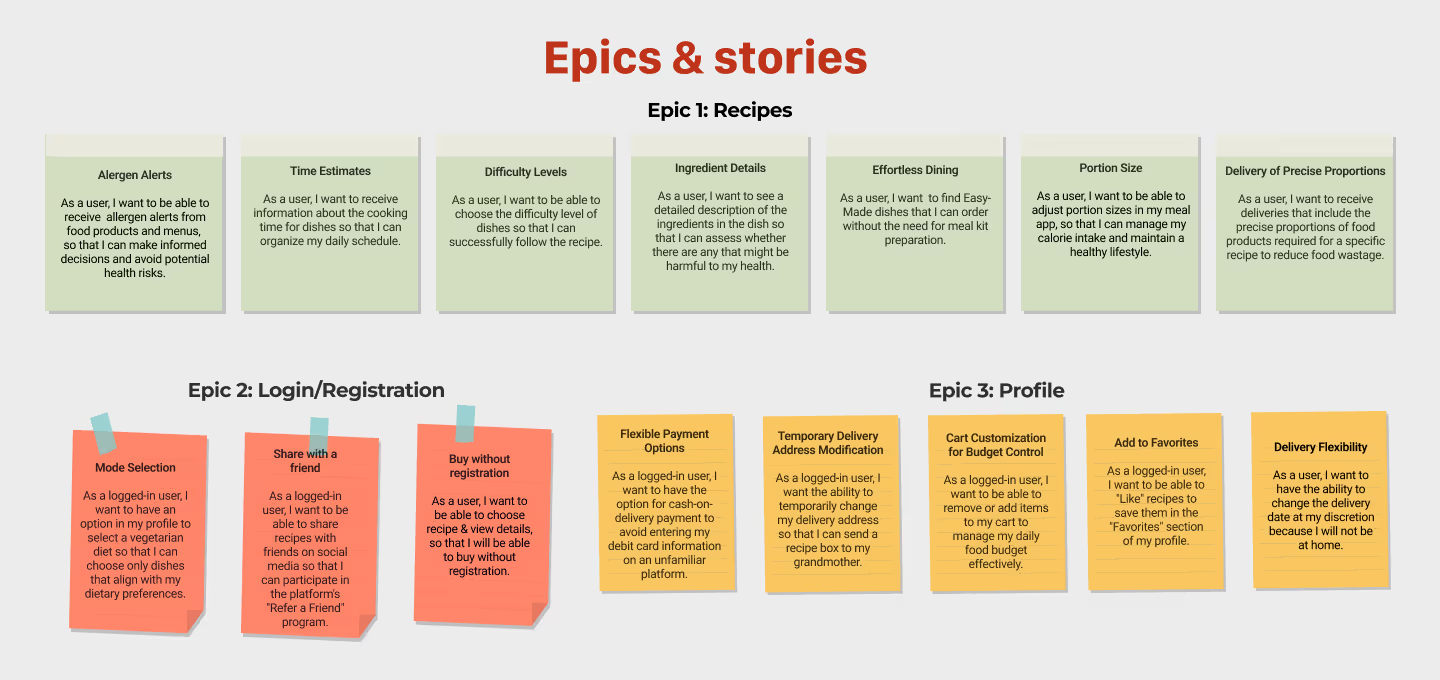
Visual layout showing categorized user stories grouped into three main epics for a meal kit subscription platform:
Epic 1: Recipes includes allergen alerts, time estimates, difficulty levels, ingredient details, portion sizing, and delivery of pre-portioned ingredients.
Epic 2: Login/Registration covers meal selection, saved info, registration via social media, and buying without registration.
Epic 3: Profile focuses on flexible payments, temporary delivery addresses, cart continuation, saving favorites, and delivery flexibility.
Each user story is framed from a user's perspective, aligning functionality with user needs like convenience, personalization, and efficiency.
These panels provide a focused snapshot of early user research and feature planning, setting the stage for the next phase of development. The survey highlights what users care about most—personalization, recipe ratings, dietary filters, and quick meal ideas. Features are thoughtfully divided into “Must Do” essentials like login, ingredient-based search, and tailored recommendations, while “Should Do” additions such as accessibility and AI support enhance the experience. Organized into epics and user stories, this information helps shape a clear, user-first roadmap moving forward.
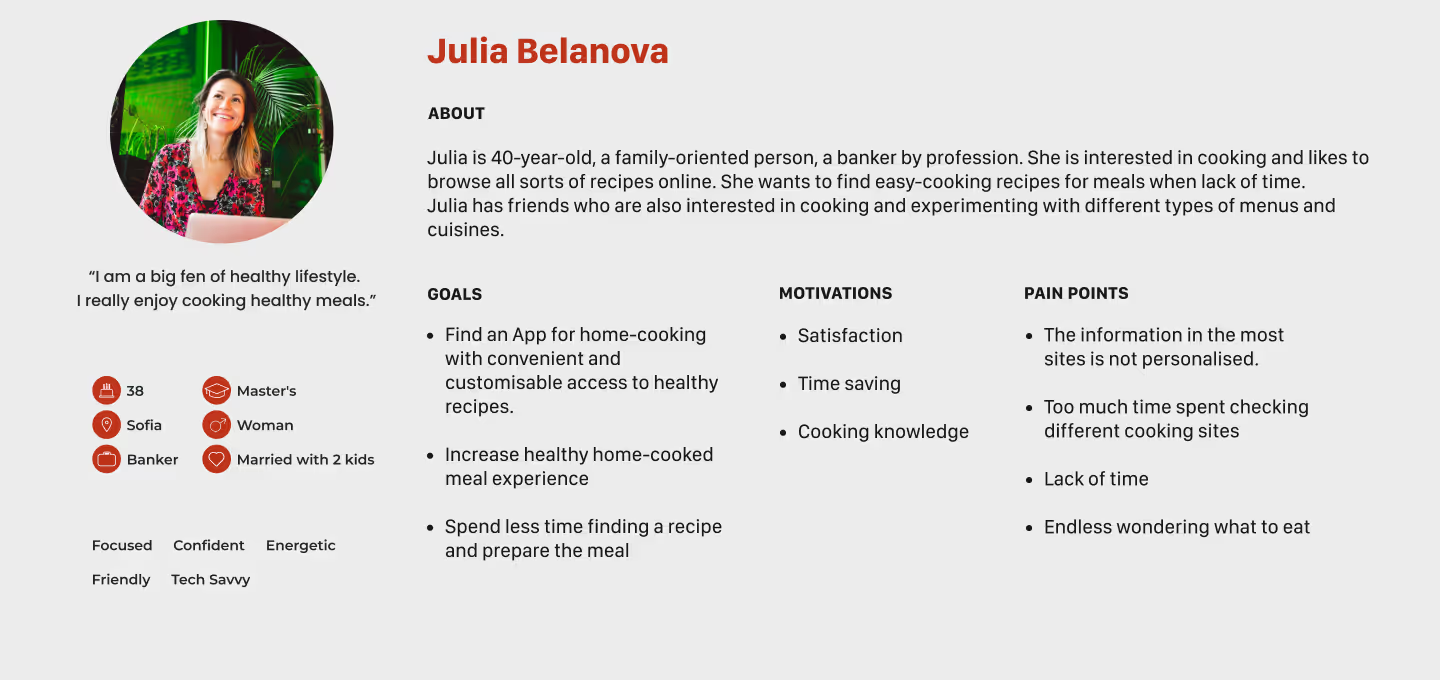
A user persona for Julia Belanova, a 40-year-old banker from Sofia who is family-oriented, health-conscious, and passionate about home cooking. She seeks a convenient app with customizable access to healthy recipes to save time and improve her cooking experience. Her goals include simplifying meal prep, increasing healthy home-cooked meals, and reducing time spent browsing recipes. Motivations are satisfaction, cooking knowledge, and time-saving. Pain points include lack of personalization on recipe websites, time wasted comparing cooking sites, and indecision about what to cook.
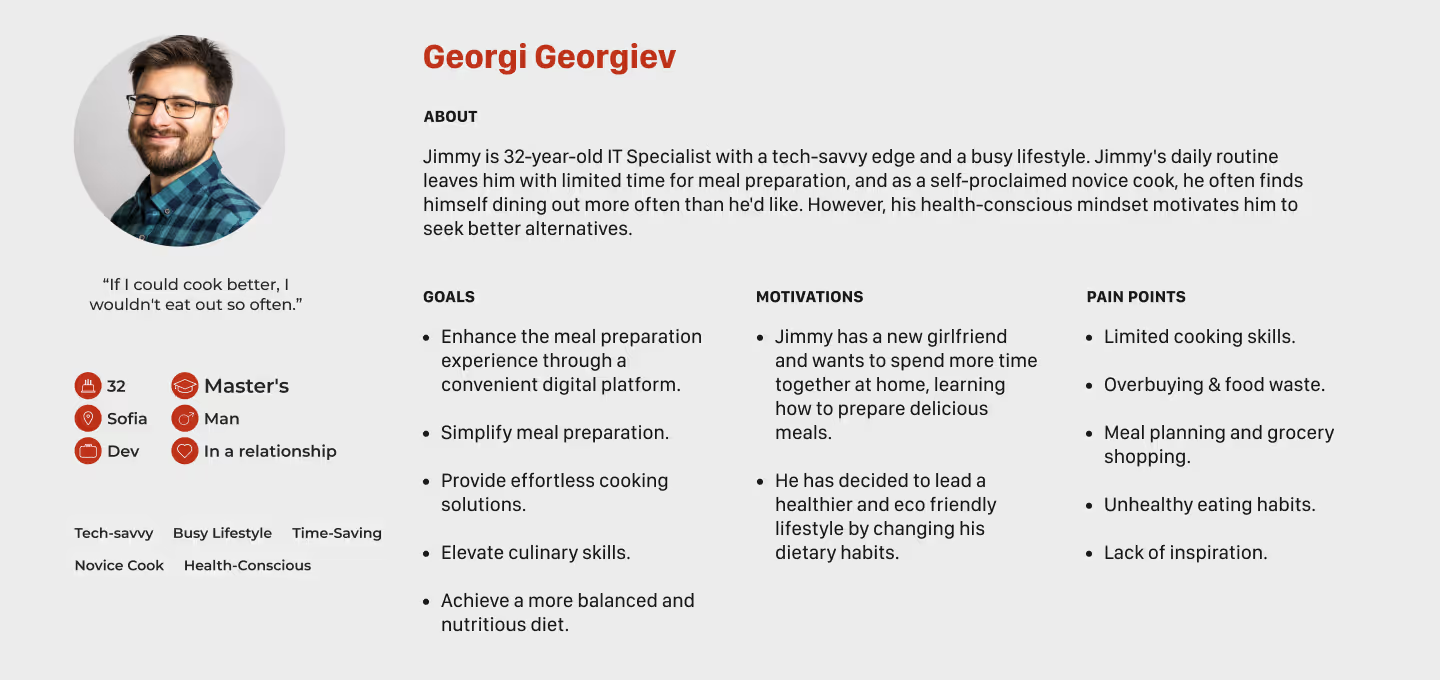
A user persona for Georgi Georgiev (Jimmy), a 32-year-old IT specialist from Sofia with a busy lifestyle and limited cooking skills. Jimmy wants to simplify meal preparation and develop healthier eating habits through a digital cooking solution. His goals include effortless cooking, balanced meals, and gaining culinary skills. Motivated by a desire to cook with his girlfriend and adopt an eco-friendly lifestyle, he struggles with overreliance on takeout, lack of inspiration, and unhealthy eating routines.
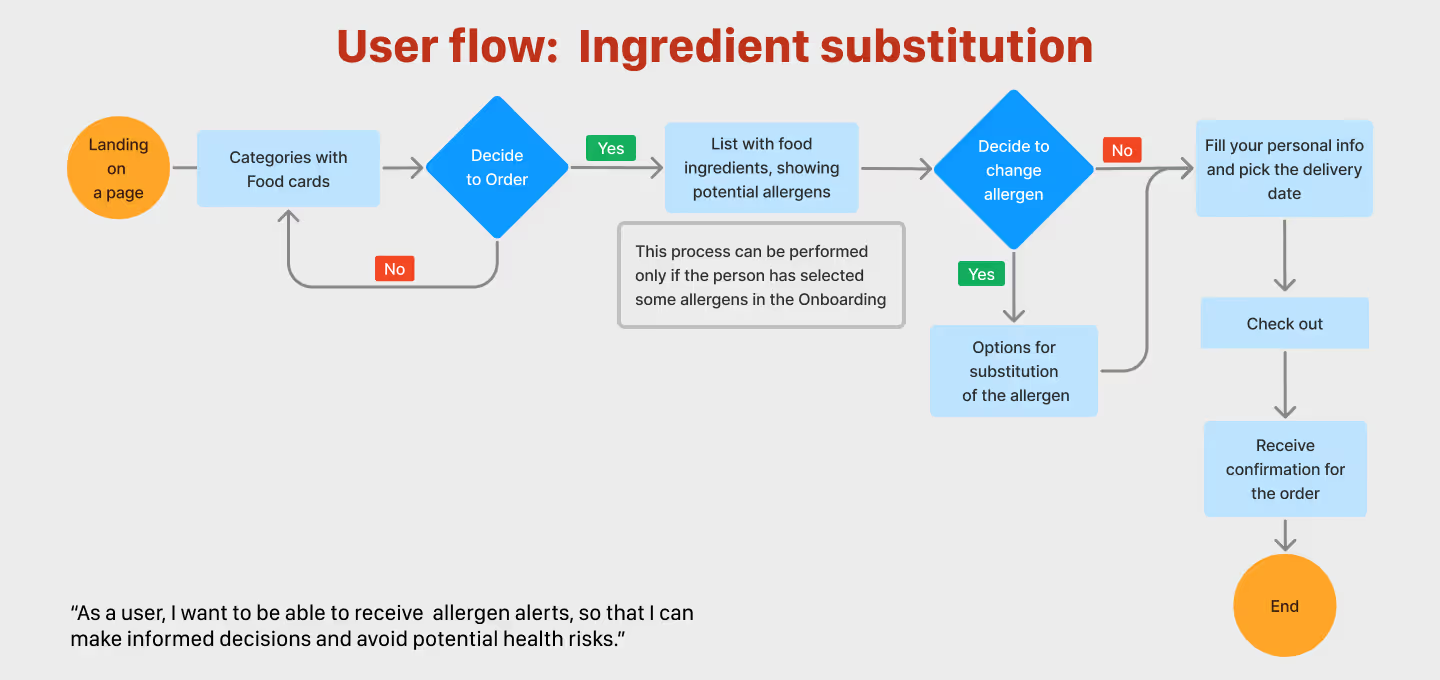
A user flow diagram showing the process of ingredient substitution in a meal kit ordering app. The flow starts from landing on the page, navigating through food categories, deciding to order, and identifying potential allergens based on onboarding input. If allergens are detected, the user is prompted to substitute ingredients. After confirming or skipping changes, the user proceeds to enter personal information, choose a delivery date, and check out. The diagram illustrates a health-conscious flow prioritizing allergen alerts and safe meal customization.
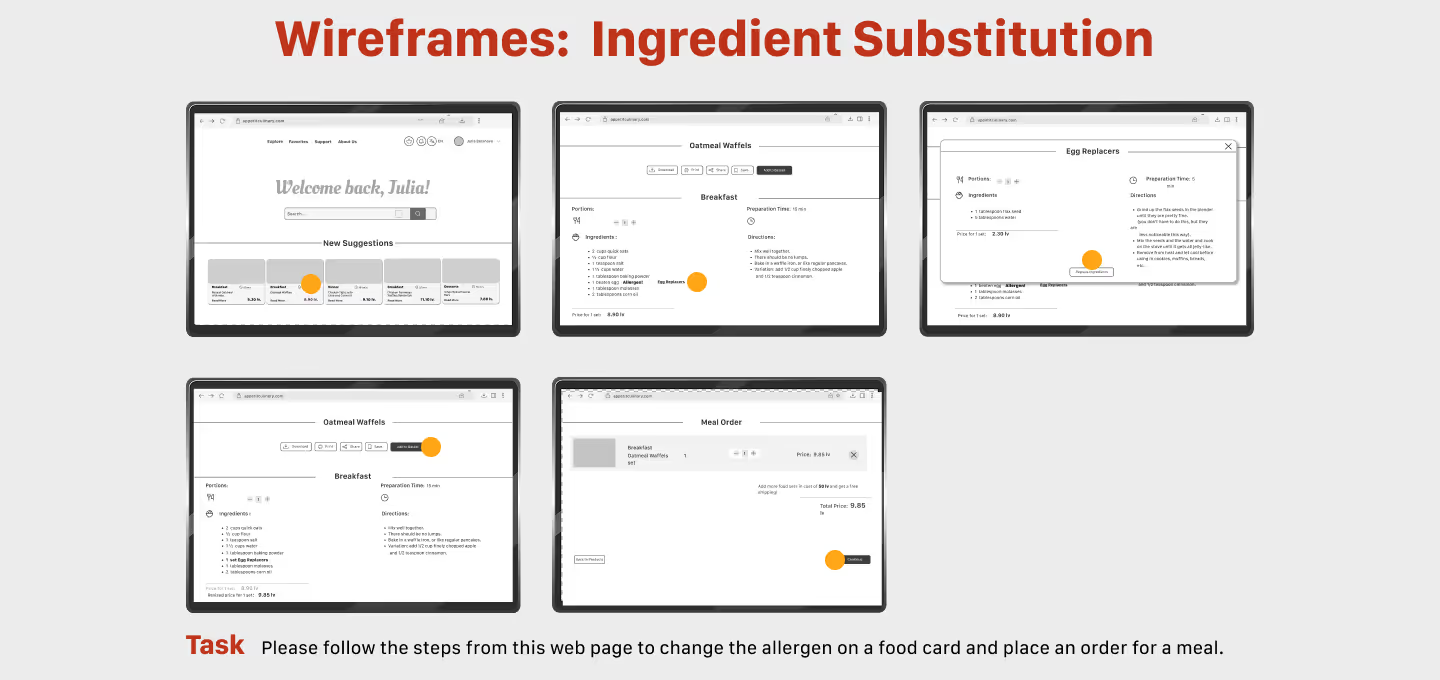
A set of five grayscale wireframes illustrating the step-by-step interface for changing an allergen in a meal ordering process. The screens show a user dashboard, a list of meal cards, allergen details, ingredient substitution options, and the final order confirmation screen. Each step is marked with an orange dot to guide the user through the interaction flow. A task note below the images instructs users to follow the steps to substitute an allergen and place an order for a meal.
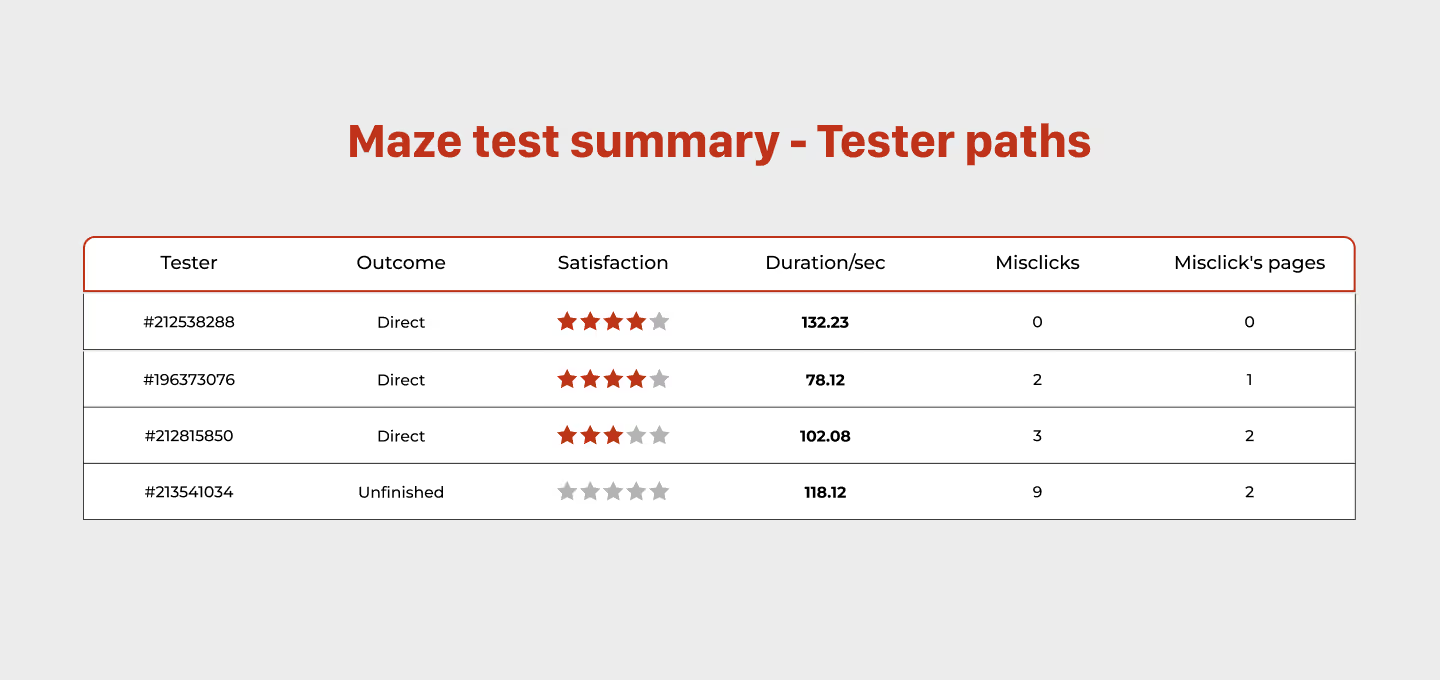
A table titled "Maze test summary – Tester paths" displays usability test results for four participants. The columns include Tester ID, Outcome (e.g., Direct or Unfinished), Satisfaction (with star ratings), Duration in seconds, Number of Misclicks, and Misclick's Pages. The first three testers completed the task with varying satisfaction and misclick counts, while the fourth tester did not finish and recorded the most misclicks.
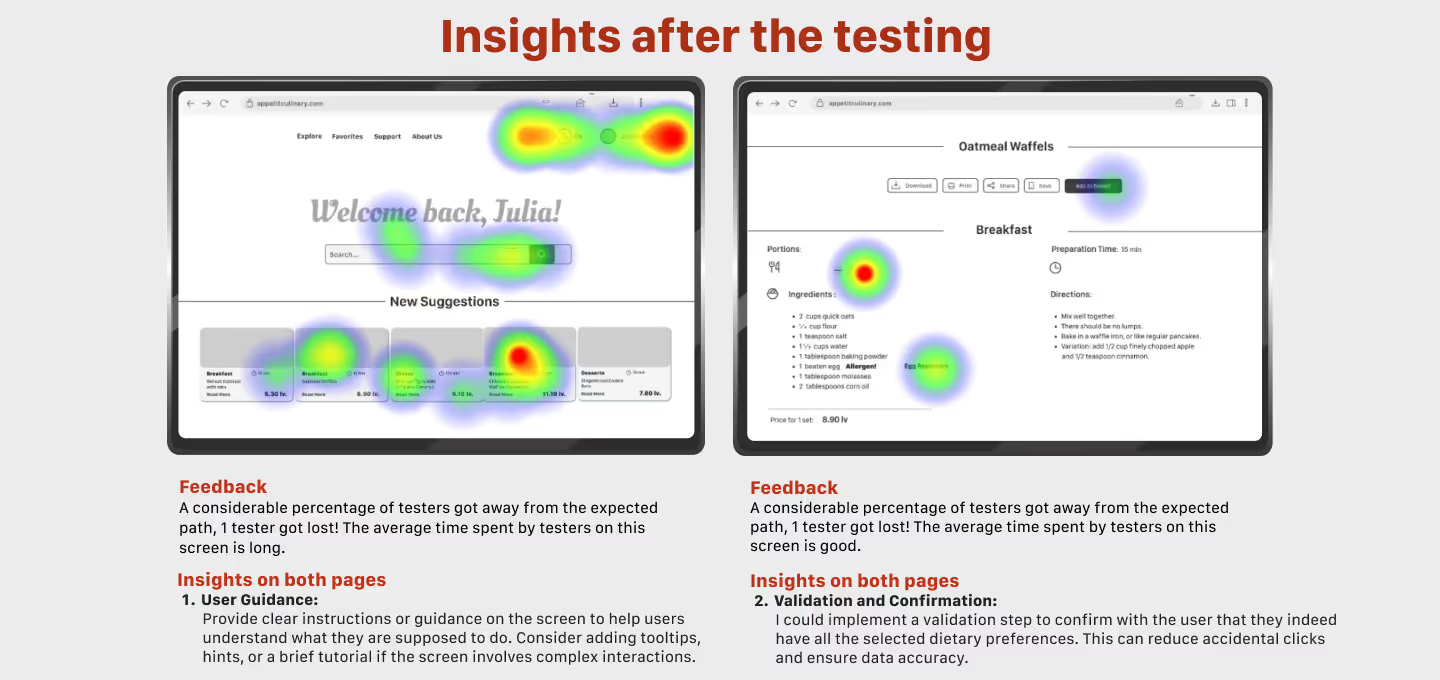
A side-by-side heatmap visualization shows user interaction data on two different UI screens from a cooking app. Red and green heat spots indicate areas of high and low user activity. Below the heatmaps, two feedback sections highlight key insights: lack of user guidance and the need for validation. Recommendations include adding instructions, tooltips, or confirmations to reduce misclicks and improve clarity.
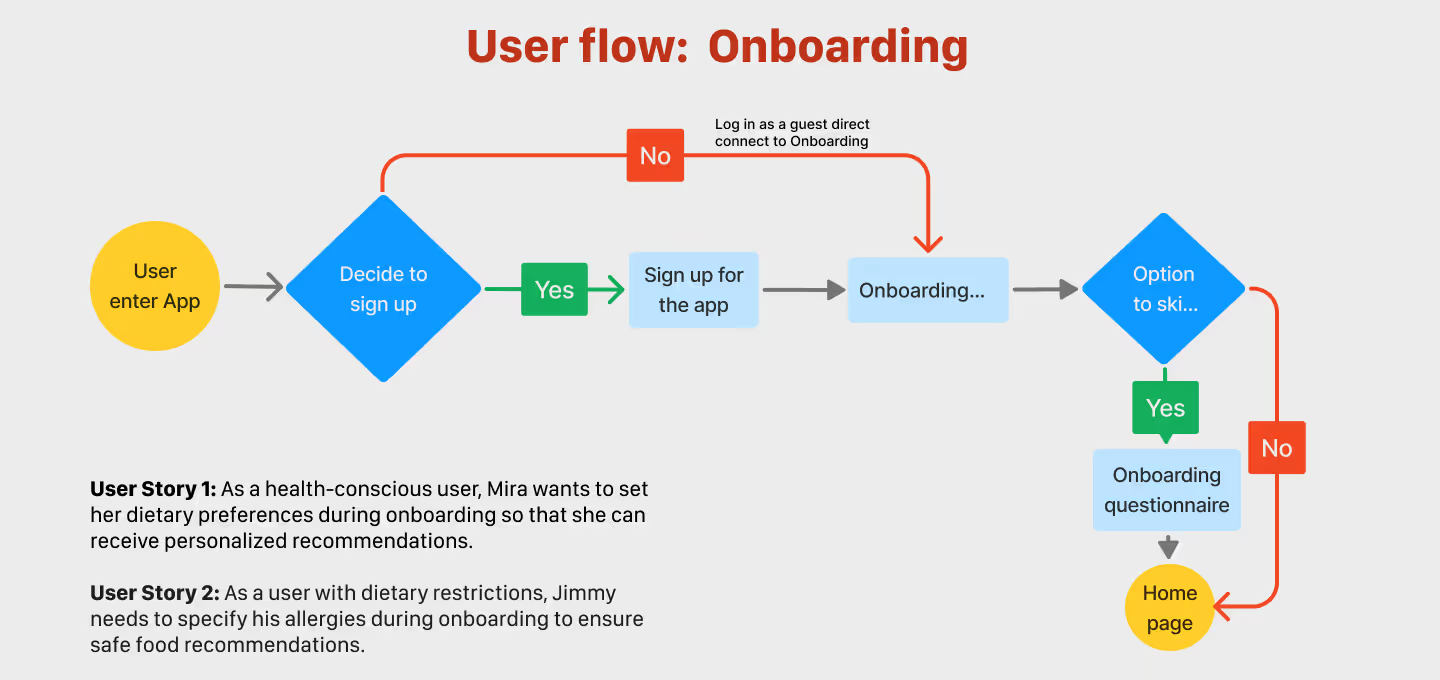
Flow chart illustrating the onboarding process of a meal kit app. It shows the decision to sign up or continue as a guest, followed by onboarding steps including a questionnaire for dietary preferences and allergies.
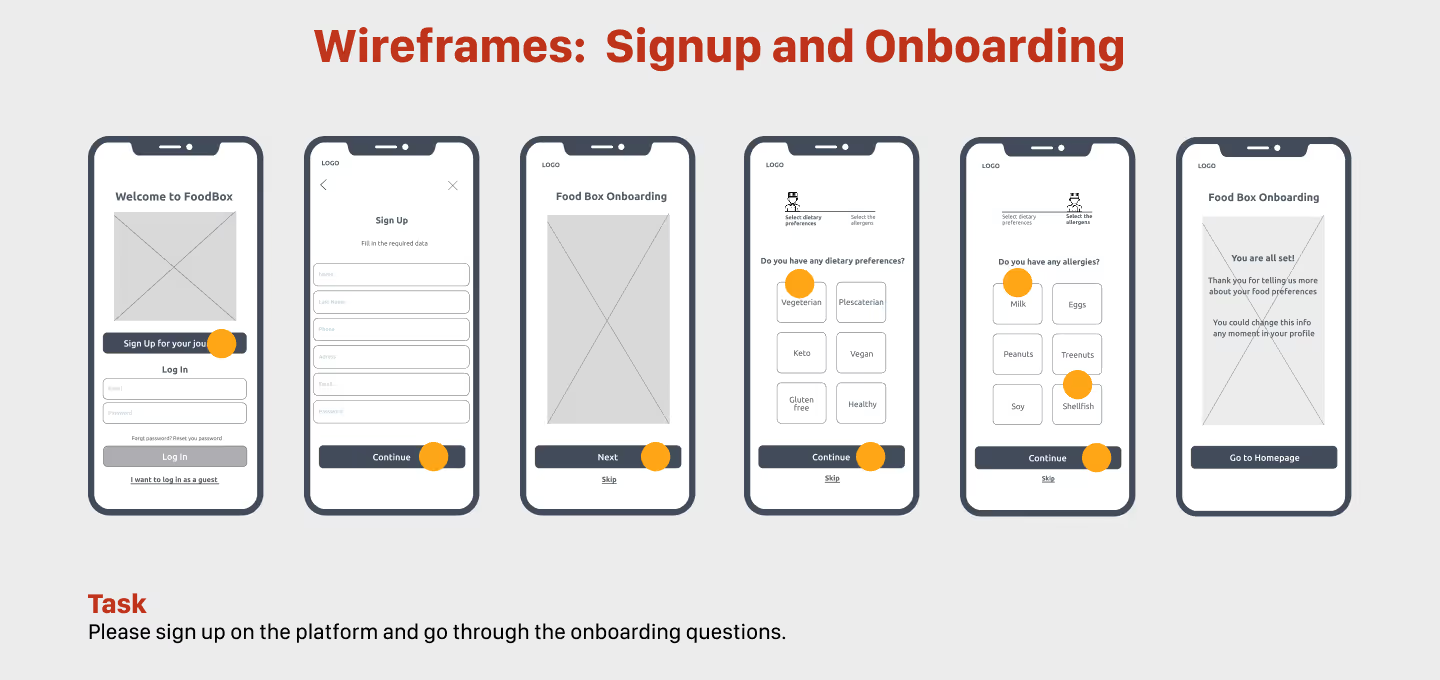
A series of mobile wireframes showing the signup and onboarding process for a food delivery app. Screens include a welcome page, signup form, dietary preference questions, allergen selection, and a final step leading to the homepage.
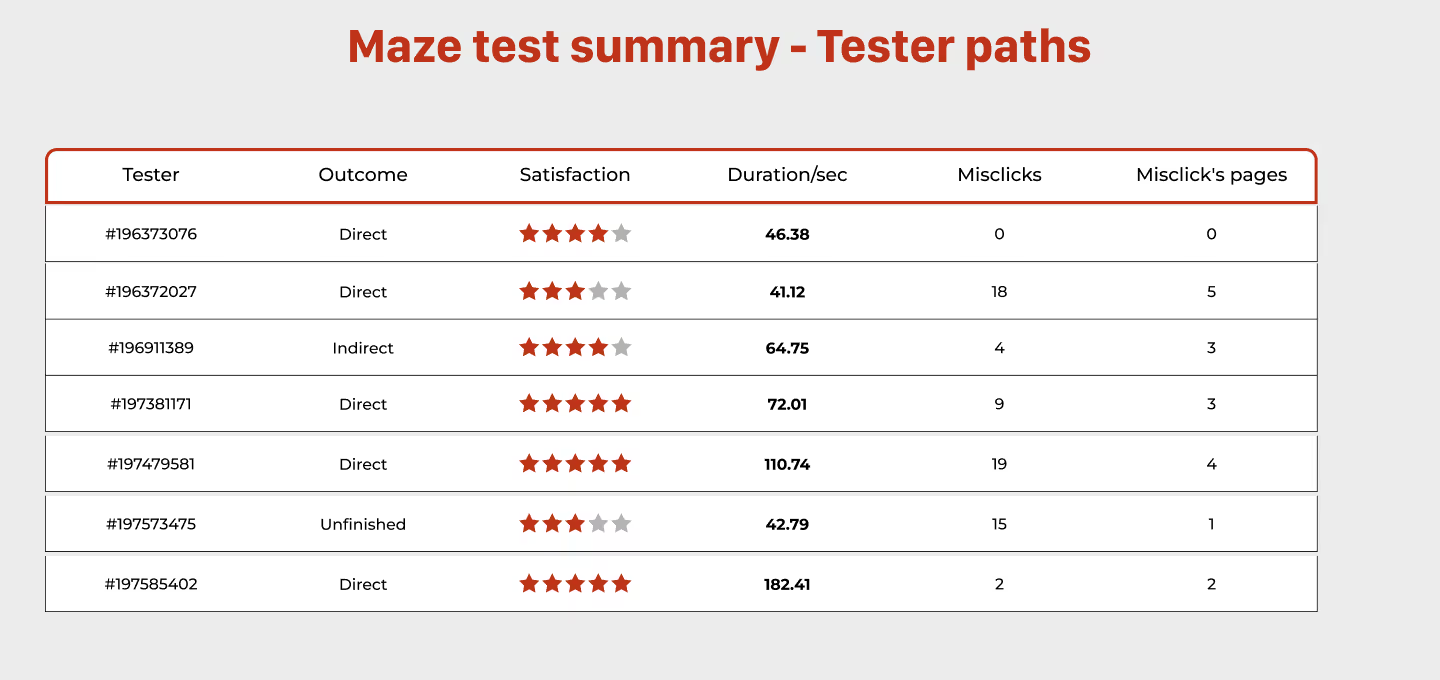
Table summarizing the results of a Maze usability test, showing tester ID, test outcome, satisfaction rating, duration in seconds, number of misclicks, and number of misclicked pages.
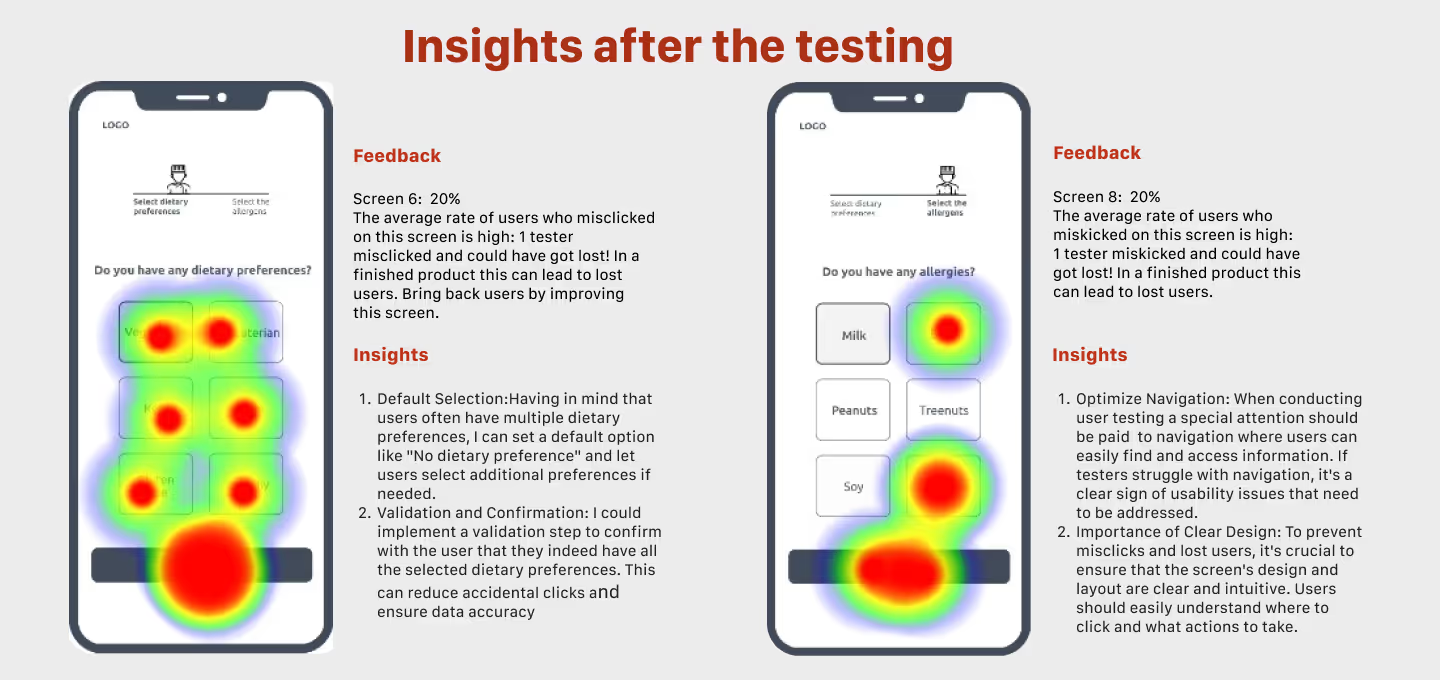
Heatmap analysis of two mobile screens from a food app usability test. The left screen asks about dietary preferences, the right screen asks about allergies. Red zones show high misclick areas. Feedback and insights highlight the need for default selections, user guidance, and better UI clarity to prevent user confusion and task failure.
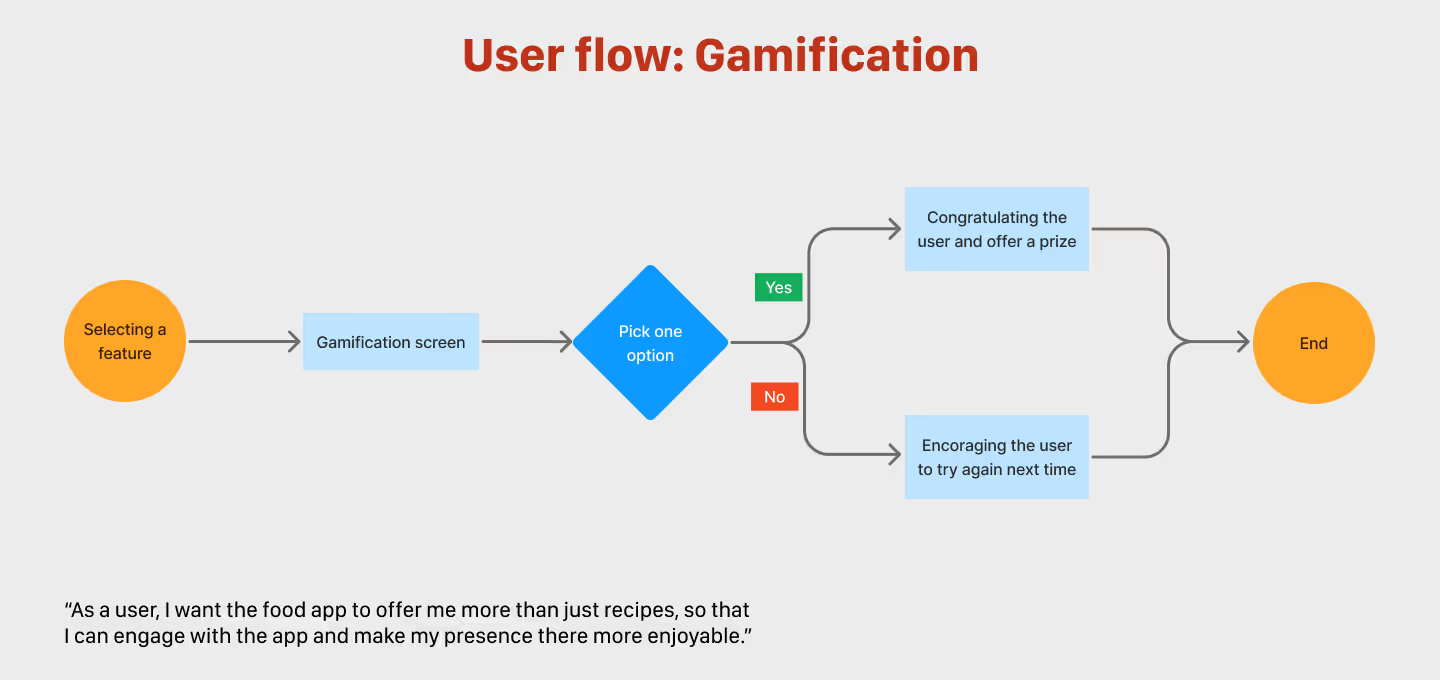
Gamification user flow in a food app, including decision point and reward feedback loop.
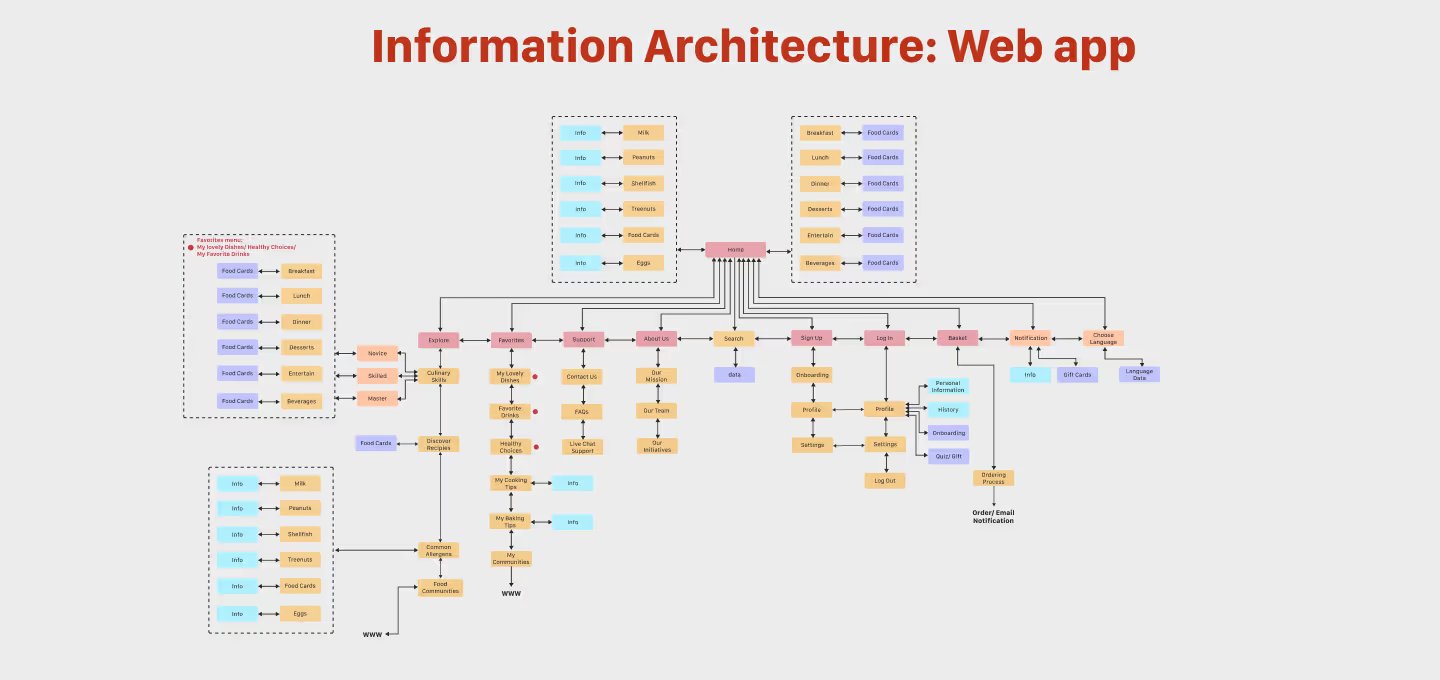
Information architecture diagram for a meal kit web application. It displays a hierarchical layout of all major sections including homepage, user profiles, recipe cards, subscription options, onboarding flow, and support content. The chart maps the user journey from general navigation to specific actions like recipe filtering, order placement, and account settings, helping guide intuitive UX design.
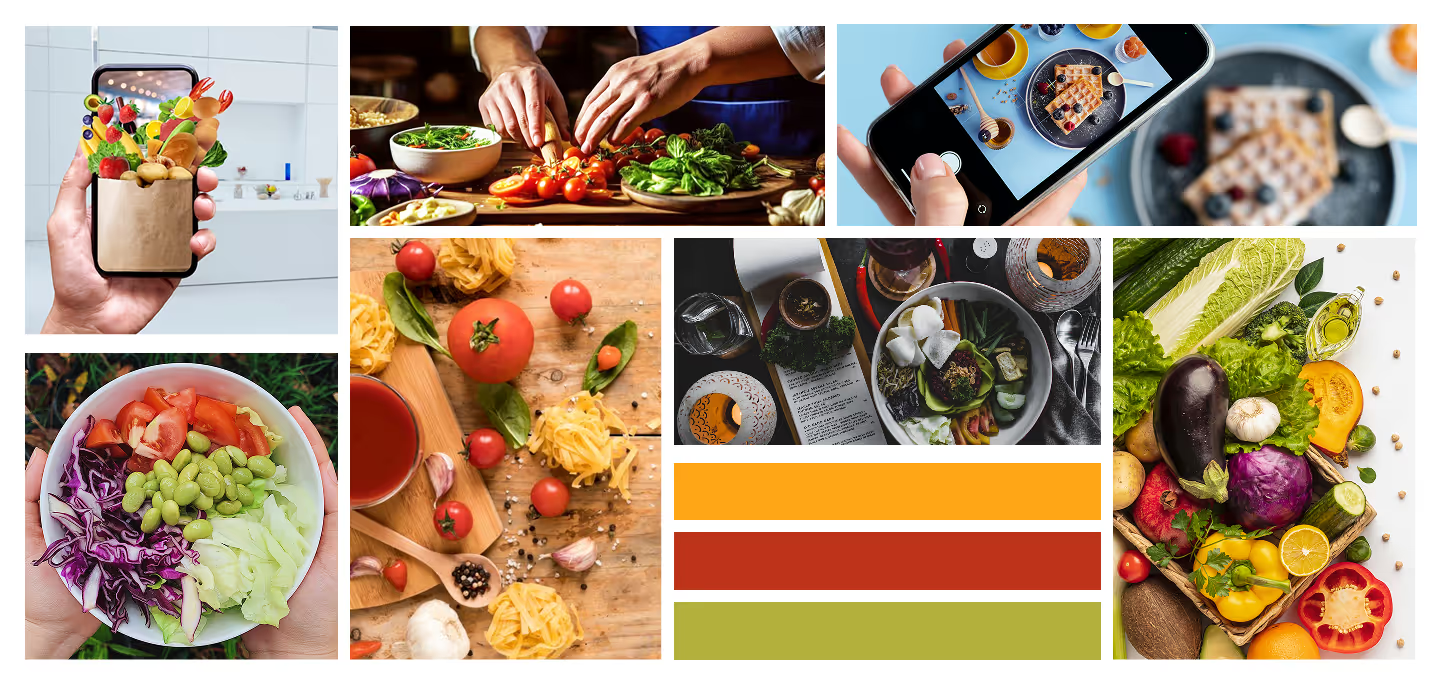
Moodboard collage showing vibrant food-related imagery including fresh vegetables, hands preparing meals, smartphone food photography, and pasta ingredients. Includes a color palette with orange, red, and green tones, emphasizing health, freshness, and creativity in cooking. Represents the visual inspiration and tone for a meal kit subscription platform.
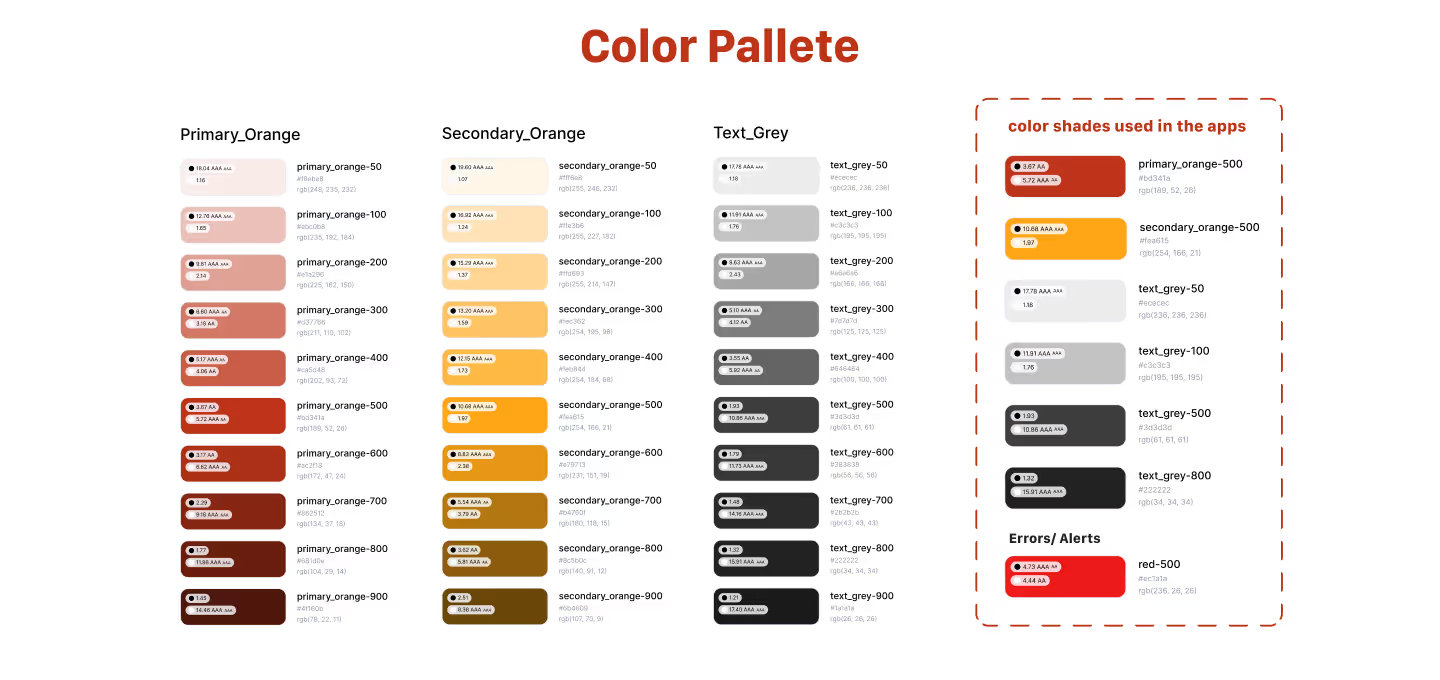
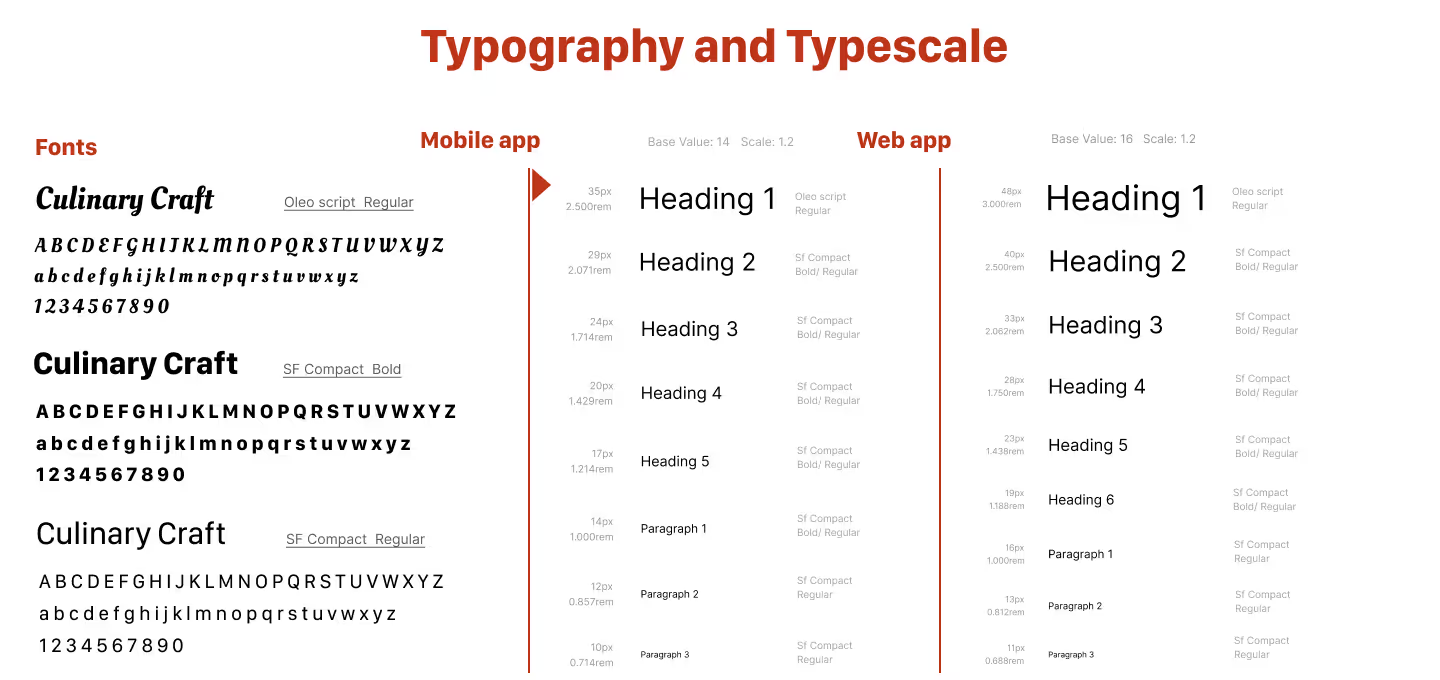
Typography and font scale guidelines for mobile and web app, using Oleo Script and SF Compact.
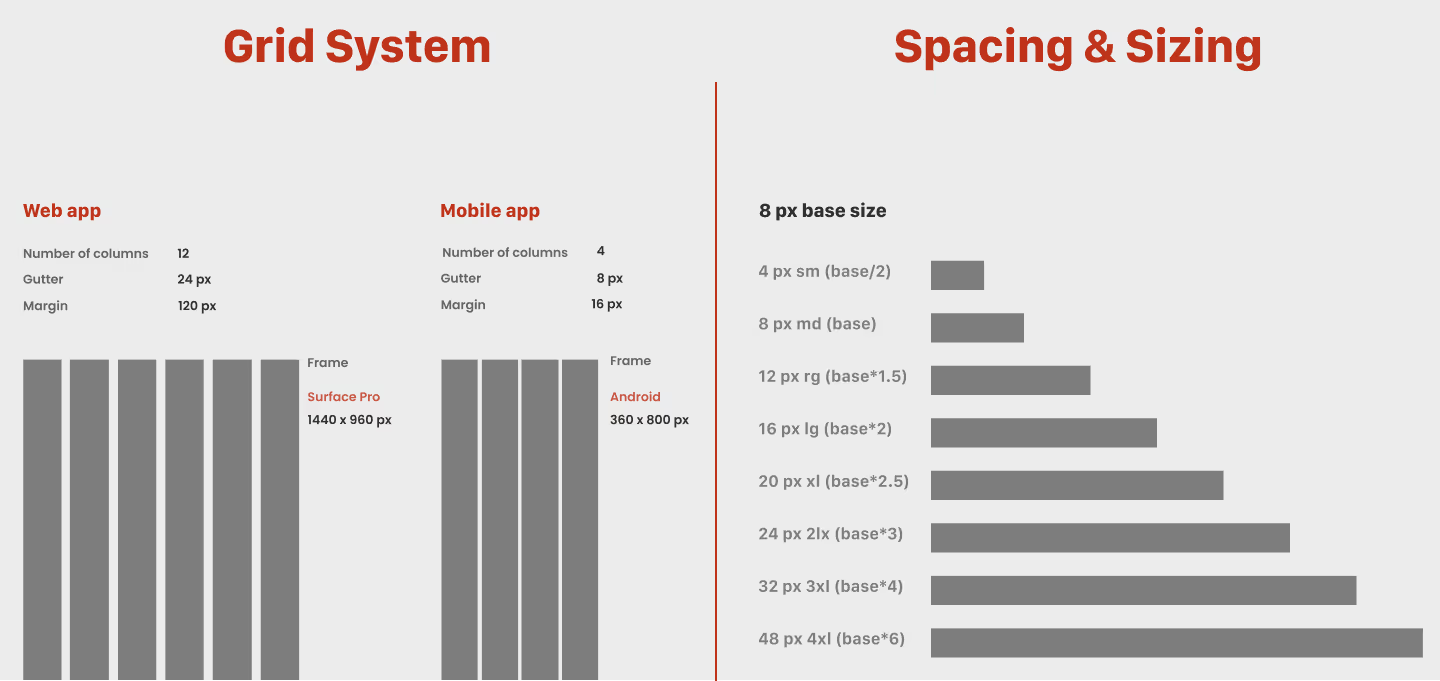
Responsive grid system for web and mobile apps, including column count, gutter width, and margins (12 columns for web with 24px gutter, and 4 columns for mobile with 8px gutter).
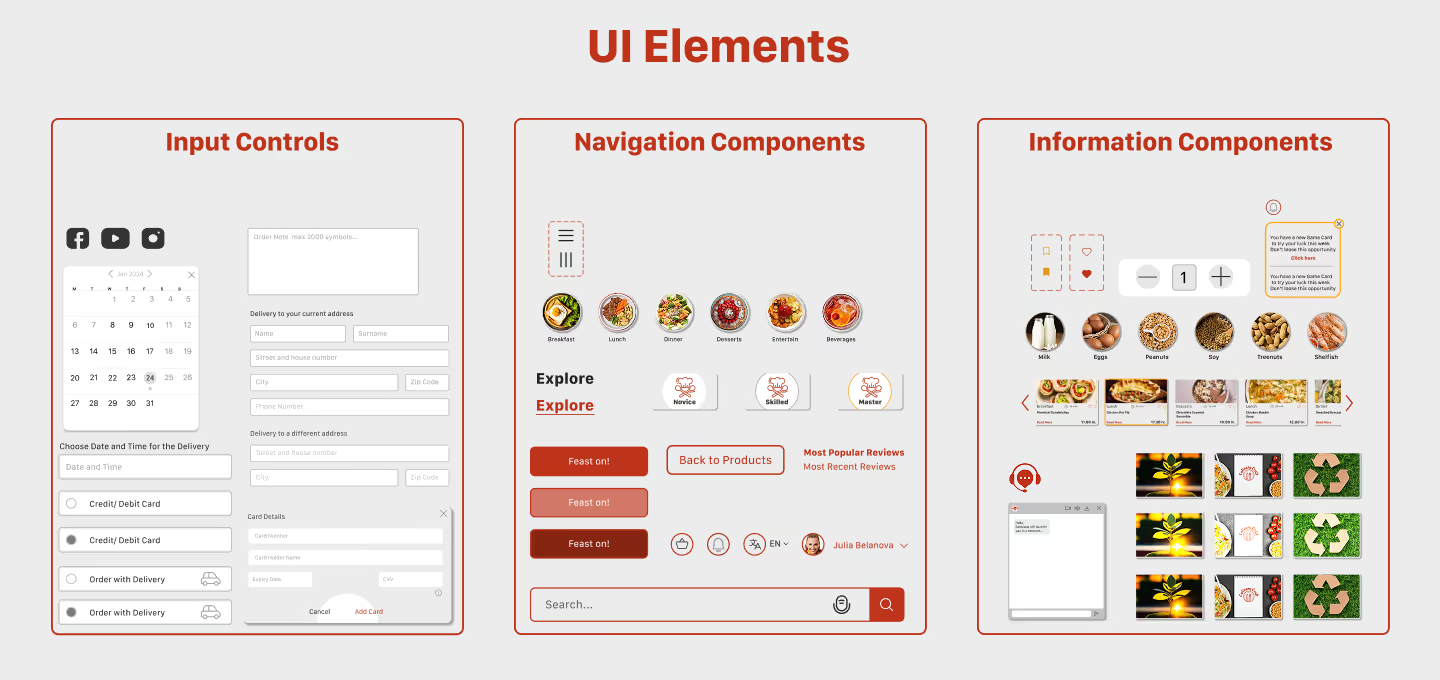
Overview of UI components: input fields, navigation tools, and content display elements.
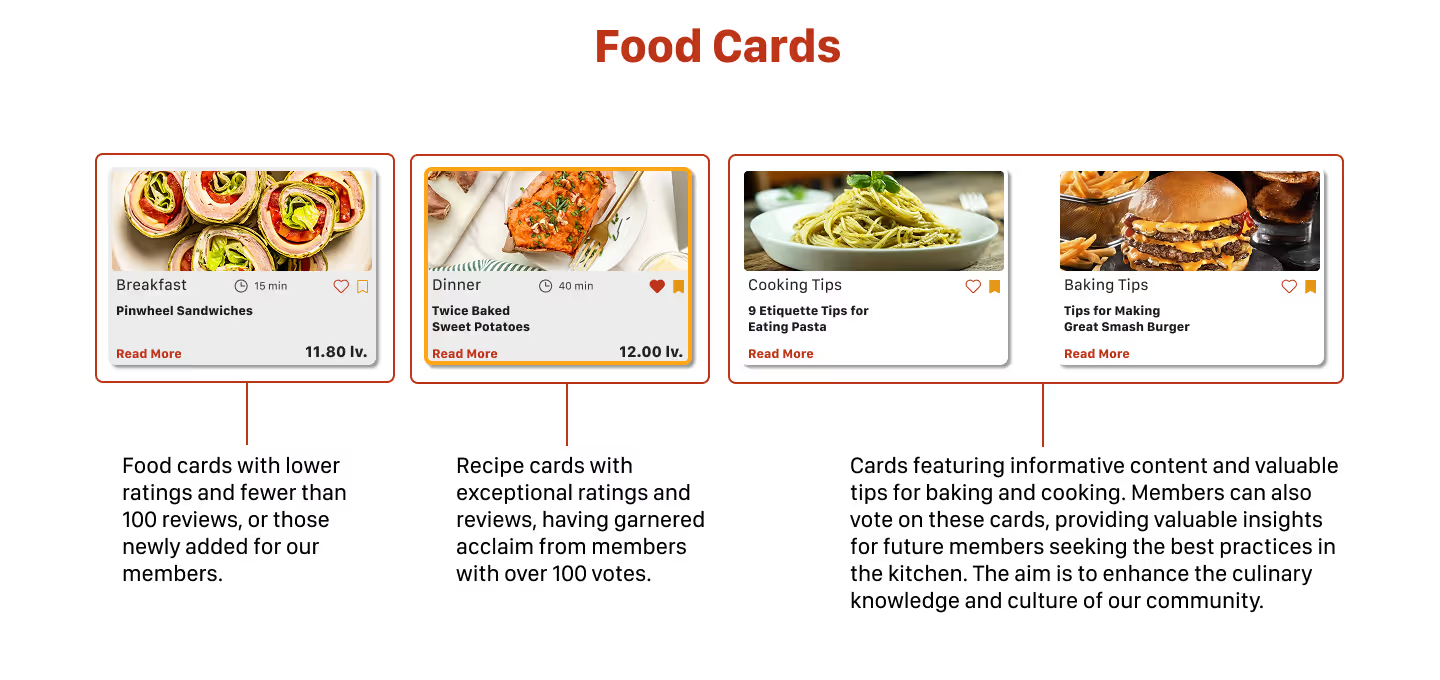
Visual display of different types of food cards in a recipe platform: Breakfast cards with lower ratings or new entries, Dinner cards with high ratings and over 100 votes, and Cooking and baking tips cards containing useful kitchen insights. Each card includes title, image, time, rating, price, and voting icons.
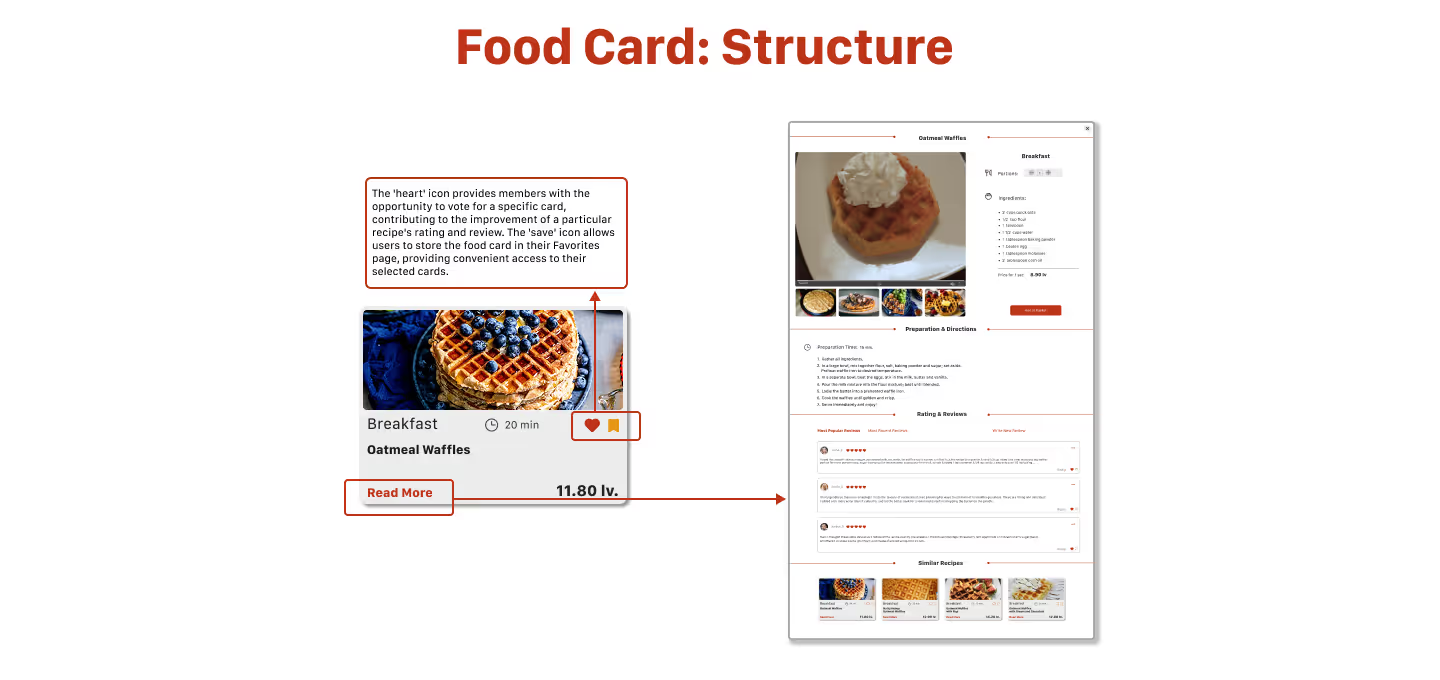
The structure of a food card and its detailed view. The left panel displays a card with title, image, rating, prep time, price, and interaction buttons like favorite and read more. The right panel shows the expanded detailed page with full recipe, ingredients, reviews, and related suggestions.
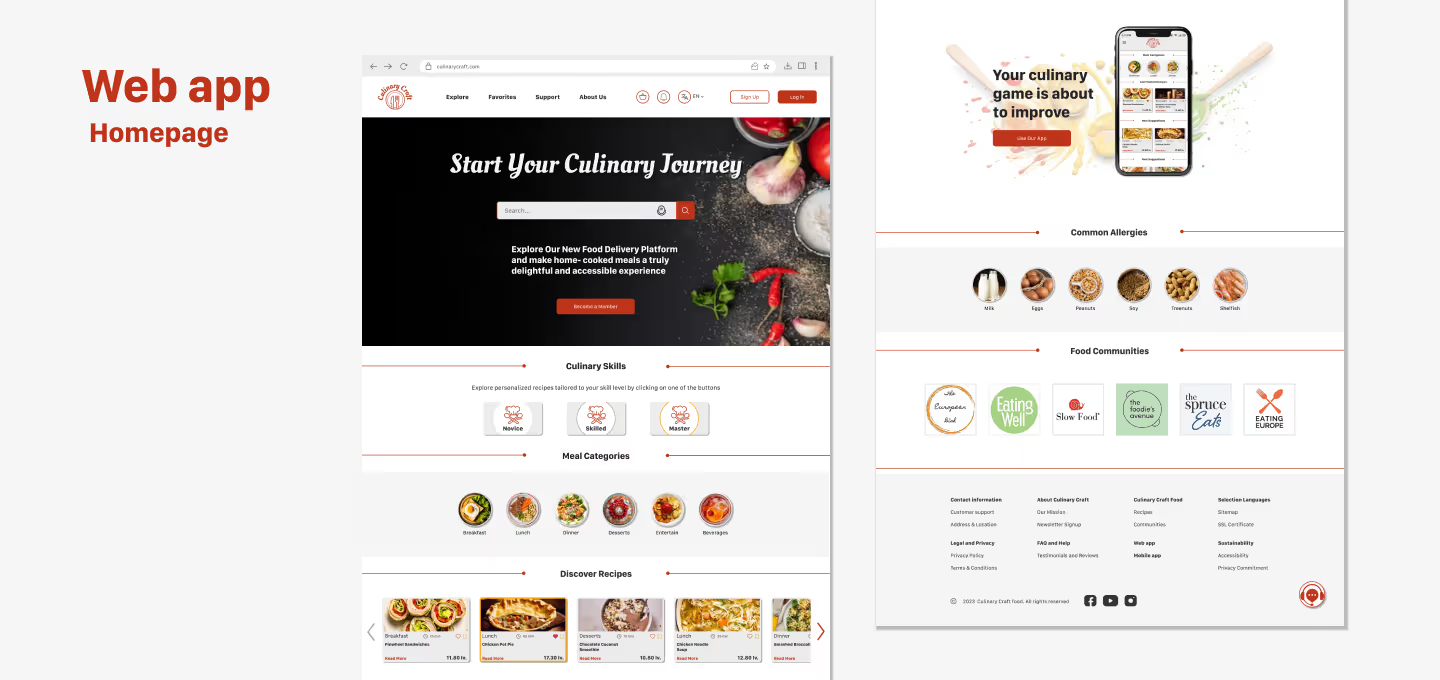
Screenshot of the web application's homepage for Culinary Craft. The layout features a dark hero section with a search bar, interactive icons for culinary skills and food categories, recipe thumbnails, and a footer with food-related filters and mobile app promotion.
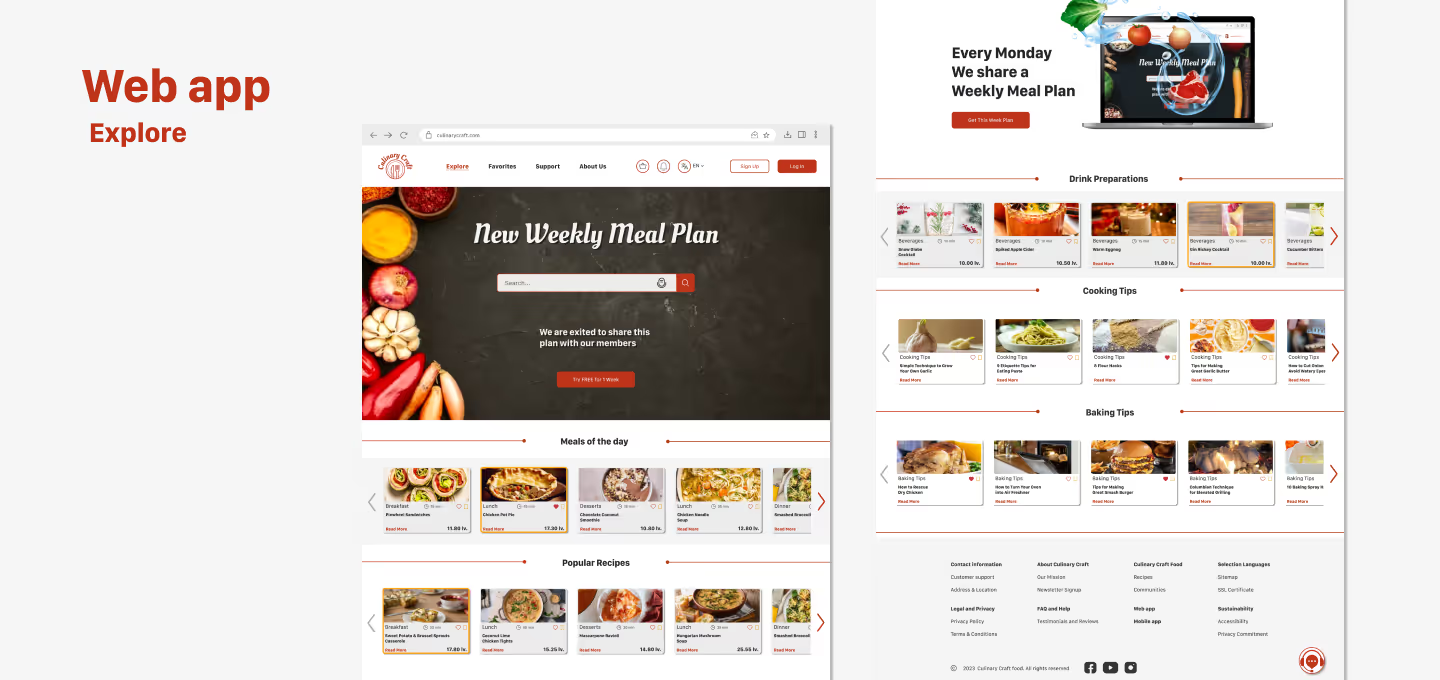
Explore section of the Culinary Craft web app featuring a weekly meal plan. The screen displays a prominent search field, food category filters, and horizontal carousels of recipe cards grouped by type—such as preparation, cooking tips, and baking. A highlighted banner promotes the weekly plan feature.
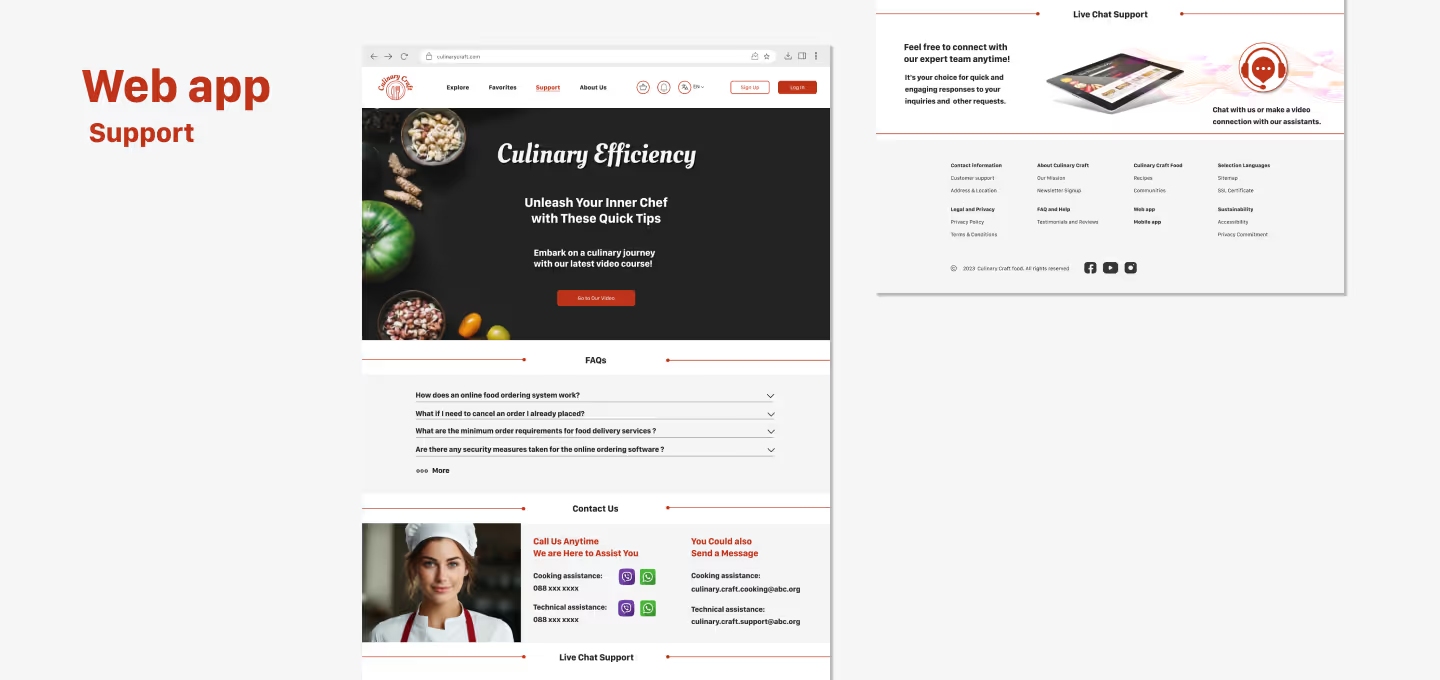
Support page of the Culinary Craft web application. The screen includes a hero section titled “Culinary Efficiency,” a FAQ accordion with common questions, live chat support prompts, and visual contact options including a chef avatar and messaging buttons for WhatsApp, email, and phone.
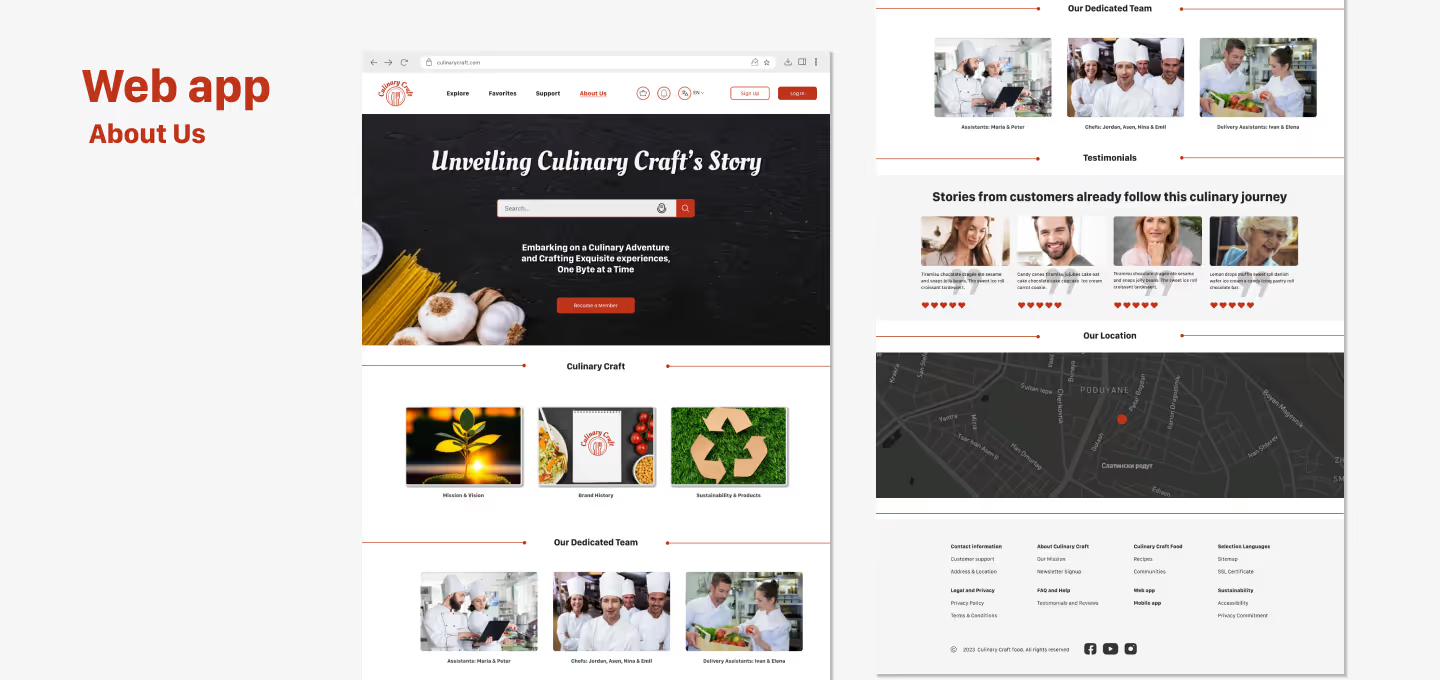
About Us page of the Culinary Craft web application showing a hero section with a tagline, introduction to the culinary mission, spotlight cards for values and practices, team member photos, customer testimonials with star ratings, and an embedded location map.
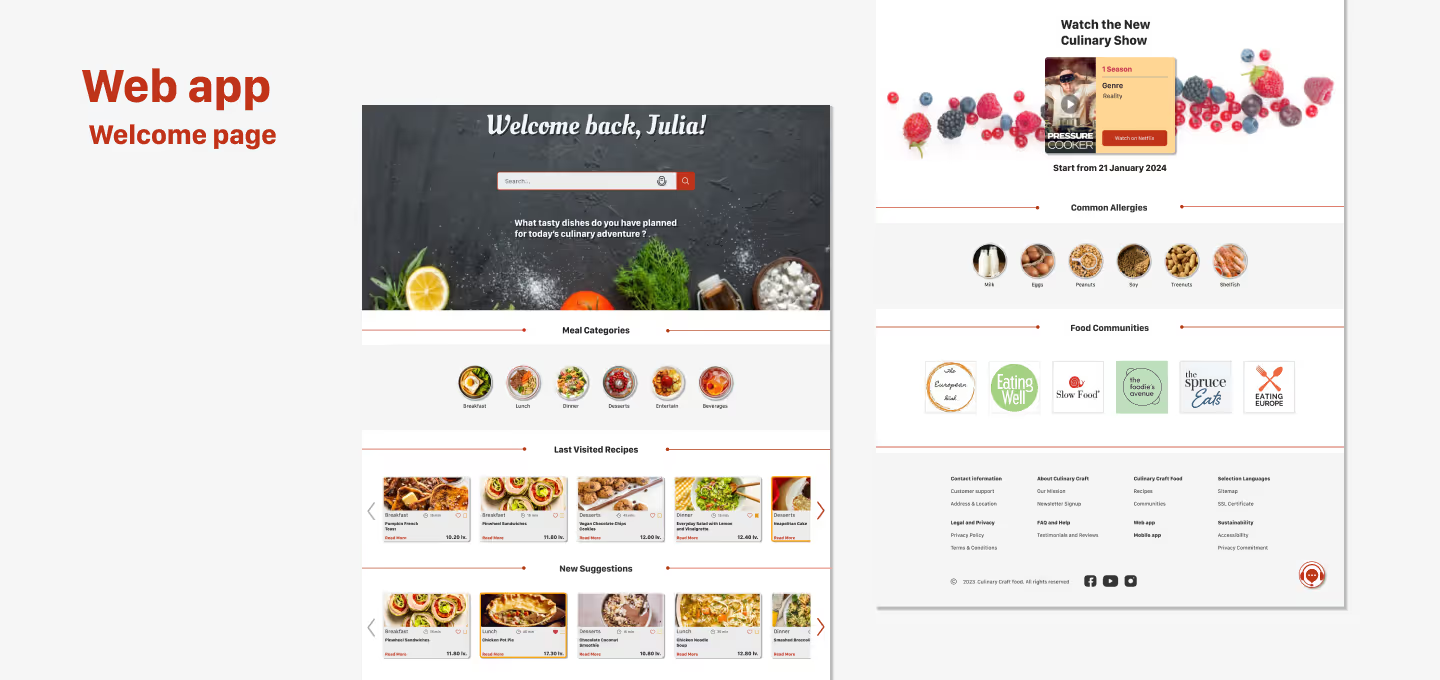
Personalized welcome page of the Culinary Craft web app displaying a greeting message for the returning user, food categories, recently viewed recipes, new suggestions, and dietary filters. Includes promotional banner for culinary content and featured food communities in the footer.
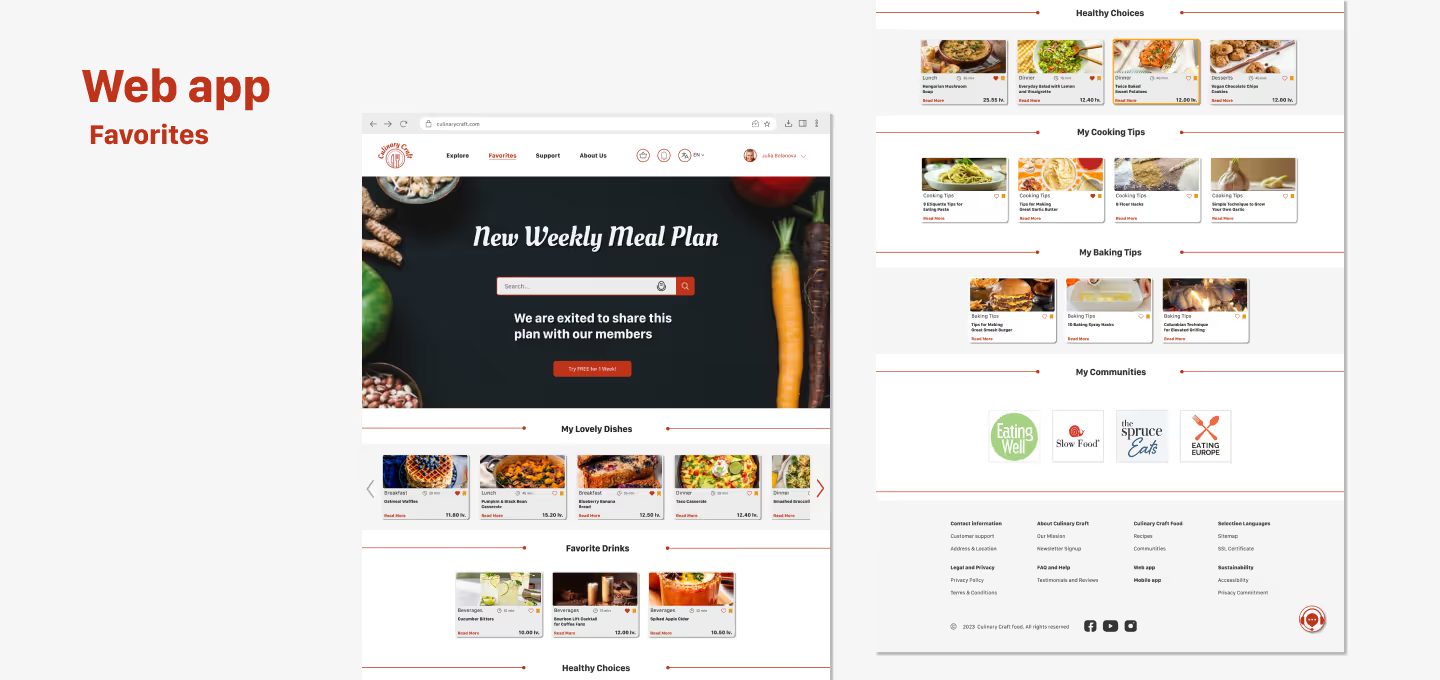
Favorites page of the Culinary Craft web app showing personalized weekly meal plan, user’s favorite dishes, saved baking and cooking tips, and food communities. Interface supports organization of user-curated recipe content.
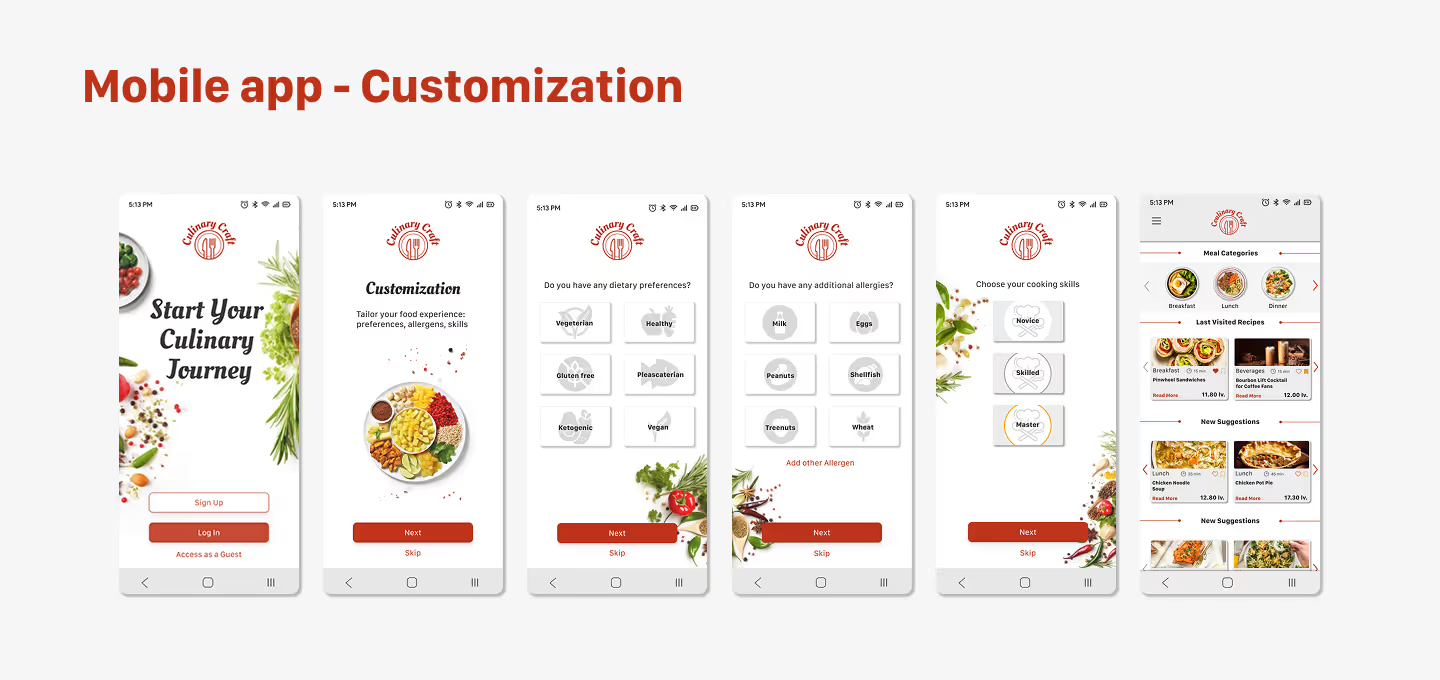
Mobile app screens showing the step-by-step customization and onboarding flow for a culinary app. Users select their dietary preferences, cuisines, meal types, and favorite dishes to receive personalized meal recommendations.
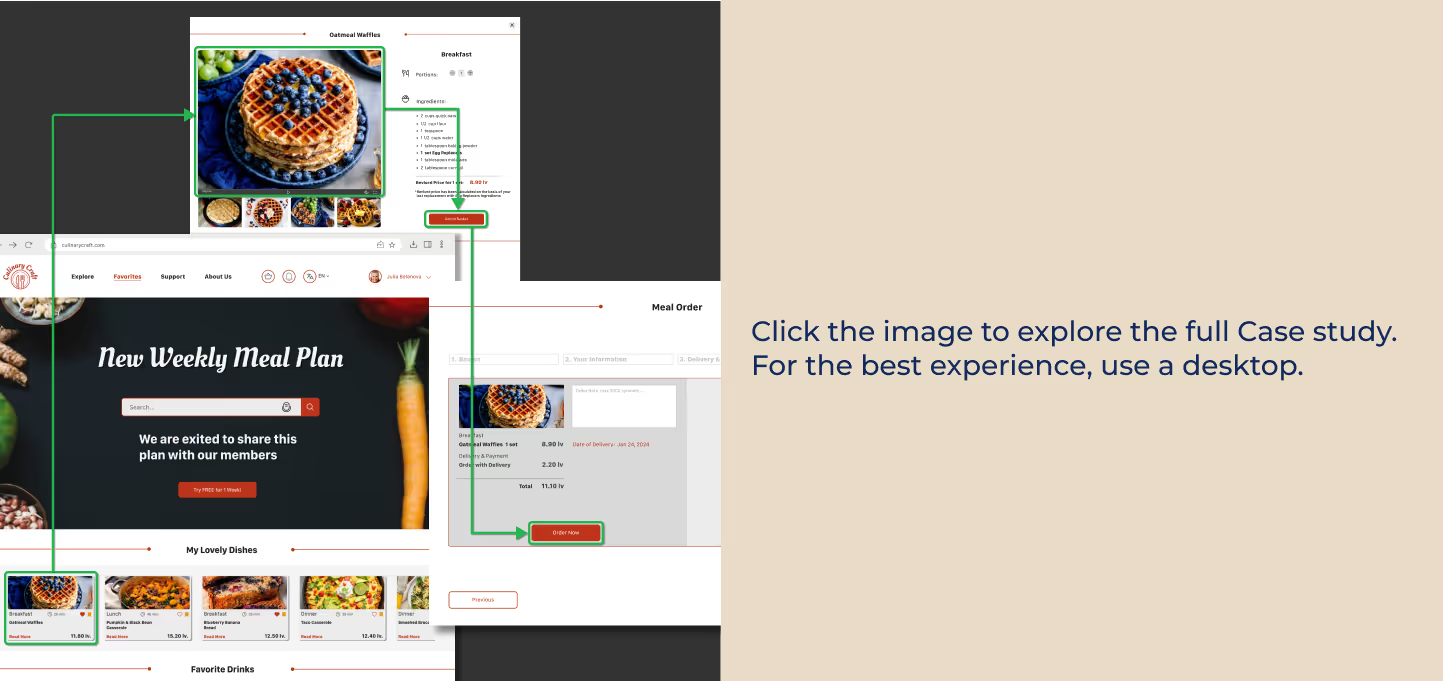
Preview image linking to an interactive Figma prototype of a culinary app case study. Displays key user interface flows including meal selection, recipe detail, and order confirmation screens. Recommended for desktop viewing.
Upward arrow icon – button used to scroll back to the top of the page.